“This post contains affiliate links. If you click and make a purchase we may earn a small commission at no extra cost to you. We only recommend tools we genuinely believe in.”
Canva AI Review for Teachers 2026 — Is Free Pro Worth It?
Most teachers already use Canva. But the AI features added in recent years have transformed it from a design tool into a genuine teaching assistant. Here is our honest review of Canva AI for teachers in 2026 — including the features most teachers do not know exist.
Canva has evolved significantly since its early days as a simple drag-and-drop design platform. With the launch of Magic Studio and a suite of education-specific AI tools, it now offers lesson planning, quiz generation, worksheet creation, interactive coding activities, and classroom management tools — all completely free for verified K-12 educators.
This review covers everything teachers need to know — what is new, what the AI features actually do, how to get free Pro access, and who Canva is best suited for in 2026.
What Is Canva for Education?
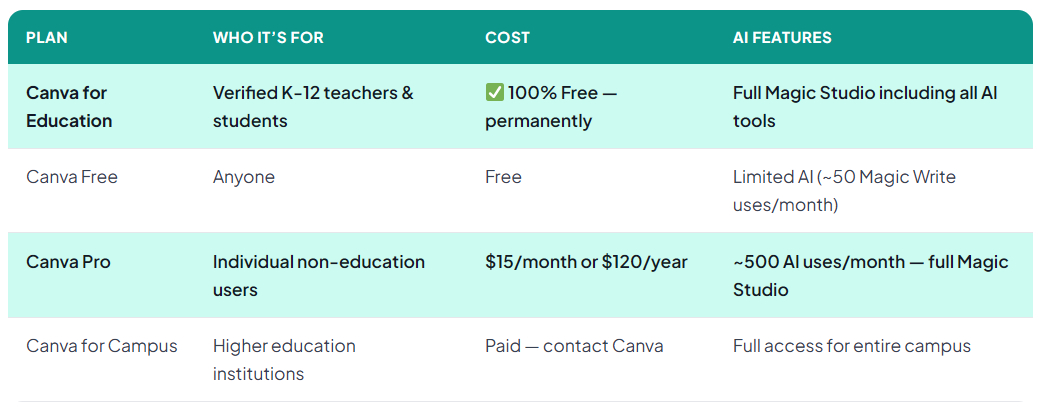
Canva for Education is the free version of Canva Pro available to verified K-12 teachers, their students, and qualified school districts. It gives educators access to the full Canva platform — including all AI features — at absolutely no cost. Canva has committed to keeping this free for K-12 education permanently.
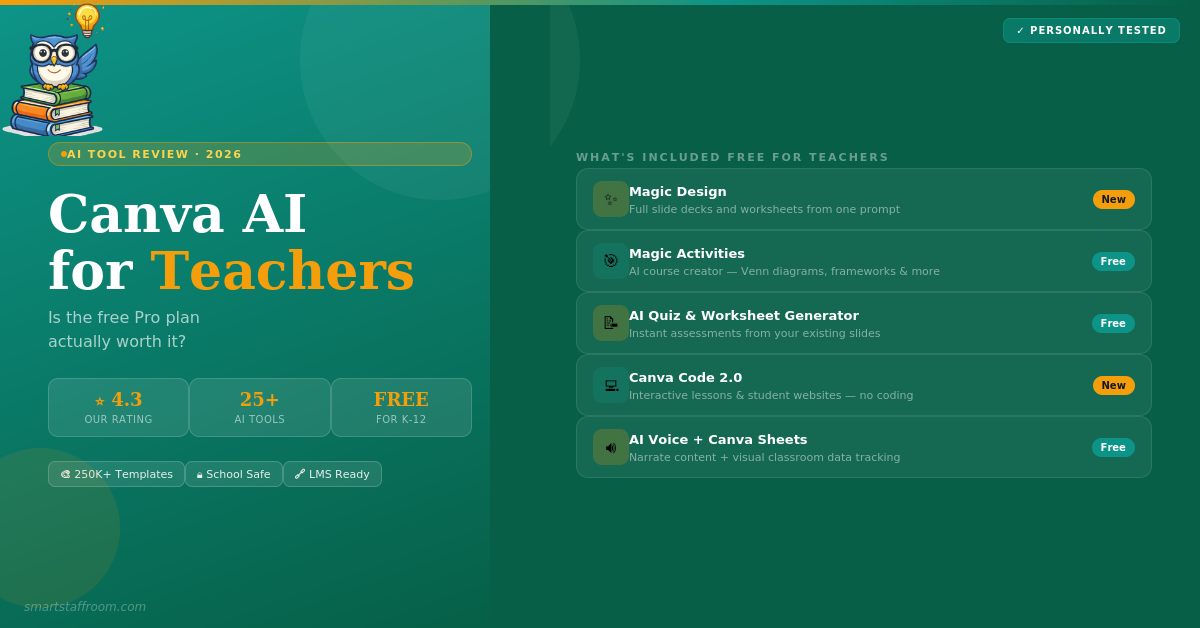
The platform started as a graphic design tool but has grown into something much broader. In 2025 and 2026 Canva launched a significant suite of education-specific features including AI lesson planning, Magic Activities, Canva Code 2.0, AI-generated worksheets, quiz generators, Canva Sheets for classroom data, and an AI voice tool. These additions make Canva genuinely useful for teaching tasks beyond just creating visual resources.
Canva AI Features for Teachers — Full Breakdown
1. Magic Write — AI Text Generator
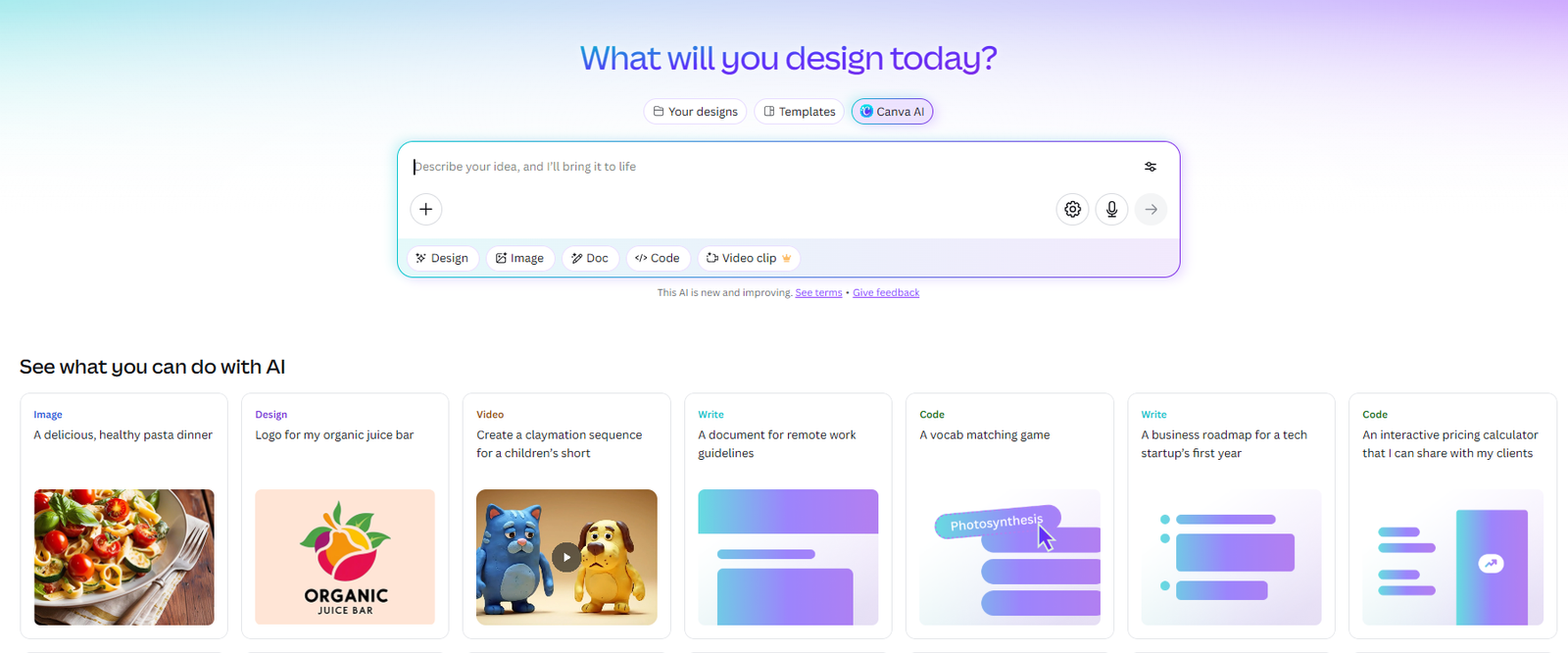
Magic Write is Canva’s built-in AI writing assistant — available directly inside any design. Ask it to write lesson plan content, worksheet instructions, presentation text, newsletter copy, or any other classroom text and it generates professional results without you leaving the editor. This removes the workflow friction of switching between ChatGPT and Canva — everything happens in one place. Teachers on the education plan get generous access to Magic Write at no cost.
2. Magic Design — Full Designs from a Prompt
Type a prompt describing what you need — “Year 5 science worksheet on the water cycle” or “parent newsletter about upcoming excursion” — and Magic Design generates a complete, professionally designed layout in seconds. The output is fully editable so you can adjust colours, fonts, content, and layout to match your exact needs. This is the feature that saves the most time for teachers who regularly create visual resources from scratch.
3. Magic Activities — AI Course Creator
Magic Activities is one of the newest and most powerful education-specific AI features. Add a prompt, define your learning objectives, and Magic Activities suggests structured classroom activities like Venn diagrams, thinking frameworks, timelines, and more — all generated and ready to customise. This goes beyond templates and actually creates pedagogically structured activities aligned to your objectives.
4. AI Quiz Generator
Transform any Canva presentation into an instant quiz with one click. The AI quiz generator creates comprehension questions based on your slide content — multiple choice, short answer, and true/false options included. For teachers who build their lessons in Canva, this means assessments are created automatically from the same content.
5. AI Worksheet Generator
Turn your Canva slides into student worksheets instantly. The worksheet generator adapts your presentation content into an activity sheet format suitable for independent or asynchronous learning. This is particularly useful for flipped classroom approaches where students need a take-home version of lesson content.
6. Canva Code 2.0 — Interactive Lessons Without Coding
Canva Code is one of the most innovative new features. Describe what you want — an interactive map, a timeline, a custom game, a quiz — and Canva Code generates it without any coding required. Students can now also use Canva Code 2.0 to design and publish their own interactive websites, making it a powerful tool for project-based learning and digital literacy development.
7. AI Voice — Narrate Any Content
AI Voice lets teachers add narration to any Canva design or invite students to record their own voice reflections. This is excellent for flipped learning resources, accessibility support for students who benefit from audio content, and creative projects where students develop their communication and storytelling skills.
8. Canva Sheets — Visual Classroom Data
Canva Sheets reimagines spreadsheets as a visual, interactive classroom management tool. Track student attendance, manage project timelines, organise class data, and collaborate with students — all in a format that is far more visually accessible than a traditional spreadsheet. For teachers who find Excel or Google Sheets intimidating, Canva Sheets is a genuinely useful alternative.
9. AI Image Generator
Generate custom, copyright-free illustrations for worksheets, classroom displays, presentations, and educational materials from a text description. This is particularly valuable for primary school teachers who need age-appropriate illustrations that do not exist in standard stock libraries, and for teachers who want unique visuals that match their specific lesson content.
10. Magic Grab and Magic Expand
Magic Grab lets you click and move objects within photos as if they were separate design elements — making it easy to edit existing images for classroom use. Magic Expand extends any image beyond its original frame using AI — useful for adapting landscape images to portrait format or extending a visual to fill a different layout.
- 250,000+ templates — including thousands of education-specific designs for every subject
- 100+ million premium visuals — photos, icons, graphics, videos, music all included free for education
- LMS integration — Google Classroom, Canvas, Schoology and more
- Assignment sharing — share work directly through Canva or via your LMS
- Real-time feedback — see student work in progress and provide comments live
- Safe for schools — multi-layered content filters ensure school-safe content
- Teacher Work Kit — curated templates and resources for common teaching tasks
- Professional development — tutorials, courses, and the Canva Teachers Community
Canva Pricing for Teachers
How Does Canva AI Perform for Teachers?
Canva scores near-perfectly for visual resource creation and ease of use — it is the gold standard for creating beautiful classroom materials quickly. The value for money score is essentially perfect because K-12 teachers get it entirely free. The AI feature quality score reflects the fact that while Magic Write and Magic Design are genuinely excellent, dedicated lesson planning tools like MagicSchool AI produce more complete and education-specific lesson plan outputs. The lesson planning tools score reflects this gap — Canva’s lesson planning is a strong supplementary feature but not a replacement for a dedicated tool.
Canva AI Pros and Cons for Teachers
✅ Pros
- 100% free for K-12 teachers permanently
- Best visual resource creation tool available
- 250,000+ education templates
- No design skills required
- Magic Design generates full layouts from prompts
- Canva Code creates interactive lessons without coding
- LMS integration — Google Classroom, Canvas, Schoology
- Students can be invited free to the class
- Safe content filters for schools
- Constantly adding new education features
❌ Cons
- AI is a bonus — not the core focus
- Lesson planning less comprehensive than MagicSchool AI
- Some AI features limited in education accounts
- Can be slow on older devices
- Verification takes a few days
- Higher ed access requires institution arrangement
Who Is Canva AI Best For?
Canva is the best AI tool available for teachers who create a lot of visual resources — worksheets, presentations, posters, classroom displays, newsletters, and activity sheets. If you spend significant time making materials look professional and engaging, Canva will save you 1–2 hours every week and dramatically improve the quality of your outputs.
It is particularly powerful for primary school teachers who need colourful, visually engaging materials; teachers who present regularly and want professional-looking slides; and any educator who communicates with parents through visual newsletters or notices.
For dedicated lesson planning, differentiation, report writing, IEP goals, or communication tools — you still need a tool like MagicSchool AI alongside Canva. The two tools complement each other perfectly: MagicSchool AI for content and admin, Canva for presentation and design.
🦉 Our Verdict
Canva for Education is an essential free tool for every K-12 teacher. Sign up today, get verified, and start using it for your next worksheet or presentation. The free Pro access for educators is one of the best deals in EdTech.
Use it alongside MagicSchool AI — Canva for visual design and resource creation, MagicSchool AI for lesson planning, assessment, and admin. That combination covers virtually every teaching task from both a content and a design perspective.
Frequently Asked Questions
Get Canva Free for Education Today 🎨
Sign up with your school email and get full Pro access — including all AI features — completely free for K-12 teachers. Verification takes a few days.
Get Canva Free → See All Free AI Tools🦉 Join 1,000+ Educators
Weekly AI tool reviews · Free resources · No spam
By subscribing you agree to receive weekly emails from Smart Staff Room. Unsubscribe anytime.
Last updated: March 2026.