“This post contains affiliate links. If you click and make a purchase we may earn a small commission at no extra cost to you. We only recommend tools we genuinely believe in.”
Best Free AI Tools for Teachers in 2026 — Honestly Tested
Every teacher deserves access to great AI tools — regardless of budget. The good news is that some of the most powerful AI tools for educators in 2026 cost absolutely nothing. Here are the eight best ones we have personally tested.
Between shrinking school budgets and the overwhelming number of AI tools launching every week, knowing which free tools are actually worth your time is genuinely difficult. We have done the testing for you — running each tool through real classroom tasks to see which ones deliver on their promises and which ones are just hype.
Every tool on this list has a genuinely useful free plan — not a watered-down trial, but a free tier you can use meaningfully every single day. No credit card required for any of them.
What Makes a Great Free AI Tool for Teachers?
Not all free plans are created equal. Some tools offer a free tier that is so limited it is barely usable — while others give you genuinely powerful functionality at no cost. Here is what we looked for when building this list:
The free plan had to be usable daily without constantly hitting walls. It had to save real, measurable time on actual classroom tasks. It had to be easy enough to use without a tech background. And it had to be safe — meaning FERPA compliant or at minimum not using student data for AI training.
MagicSchool AI is the best free AI tool available for classroom teachers — full stop. The free plan gives you access to over 80 education-specific tools including lesson plan generators, differentiation assistants, report card comment creators, IEP goal generators, quiz builders, and much more. Everything is pre-built for education — you fill in a simple form and get a professional result in seconds.
What makes the free plan genuinely useful rather than just a teaser is the breadth of tools available. Most teachers find the free tier sufficient for daily use — only heavy users who generate content all day tend to hit the limits and need to upgrade.
Best Free Features
- Lesson Plan Generator — Full lesson plans including objectives, activities and assessments in under 60 seconds
- Differentiation Assistant — Instantly adapt any text to multiple reading levels
- Report Card Comment Generator — Professional comment options ready to personalise
- Quiz & Assessment Builder — Multiple choice, short answer and essay questions on any topic
- Raina AI Chatbot — 25 free messages per month with the education-trained AI assistant
✅ Pros
- Most generous free plan available
- No prompting skills required
- FERPA and COPPA compliant
- Works for all subjects and levels
❌ Cons
- Free plan has peak-hour slowdowns
- Student Rooms requires paid plan
- Raina limited to 25 messages free
Brisk Teaching is a Chrome extension that brings AI directly into the tools you already use — Google Docs, Google Classroom, YouTube, online textbooks, and more. Instead of switching tabs to use an AI tool, Brisk sits right inside your existing workflow. Highlight any text in Google Docs and Brisk can instantly adjust the reading level, generate comprehension questions, create a quiz, or provide writing feedback — all without leaving the document.
The standout feature is its differentiation capability — Brisk can adjust the reading level of any content with a single click, which is genuinely revolutionary for teachers with mixed ability classrooms. It earned a 93% Common Sense Privacy rating — the highest of any AI tool we reviewed.
Best Free Features
- Reading Level Adjuster — Instantly adapt any text to any reading level with one click
- Assignment Feedback — Personalised feedback on student work directly in Google Docs
- Lesson Creator — Turn any online article, YouTube video, or PDF into a lesson
- Quiz Generator — Create quizzes from any content in seconds
- Works in Google Classroom — No tab switching, no copy-pasting
✅ Pros
- Works inside tools you already use
- Highest privacy rating of any AI tool
- No learning curve at all
- Outstanding differentiation features
❌ Cons
- Chrome only — no Firefox or Safari
- Requires Google Workspace for best results
- Advanced features need school plan
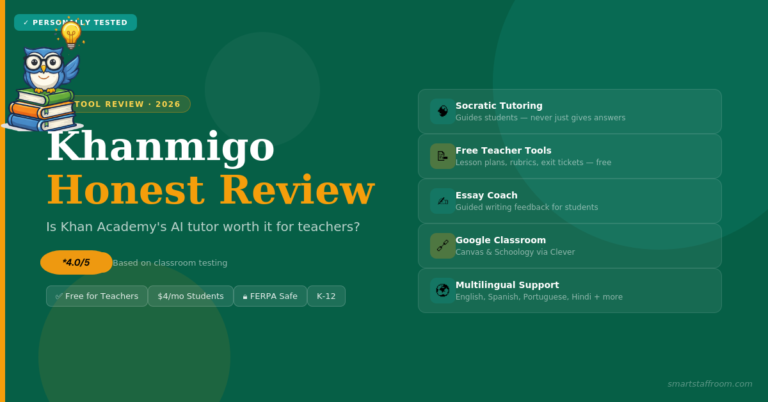
Khanmigo’s teacher tools are now free for educators — a significant change that makes one of the most educationally sound AI platforms accessible to every teacher. As a teaching assistant, Khanmigo helps with lesson planning, differentiation, quiz question generation, exit tickets, rubrics, and multilingual family emails. The quality of output is consistently strong because it is built on Khan Academy’s deep educational expertise.
Note that student access to Khanmigo requires a school or district partnership with Khan Academy — teachers cannot grant individual student access independently. But for your own teaching tasks, the free teacher tools are excellent.
Best Free Features
- Lesson Plan Generator — Detailed lesson plans aligned to Khan Academy’s curriculum
- Differentiation Tools — Student groupings, adapted materials, exit tickets
- Multilingual Family Emails — Class newsletters and parent communications in multiple languages
- Quiz and Rubric Generator — Assessment tools for any topic or standard
- Hook Generator — Engaging lesson openers to capture student attention
✅ Pros
- Free for teachers
- Built on Khan Academy’s expertise
- FERPA and COPPA compliant
- Multilingual communication tools
❌ Cons
- Student access requires district partnership
- US-focused curriculum alignment
- Less versatile than MagicSchool AI
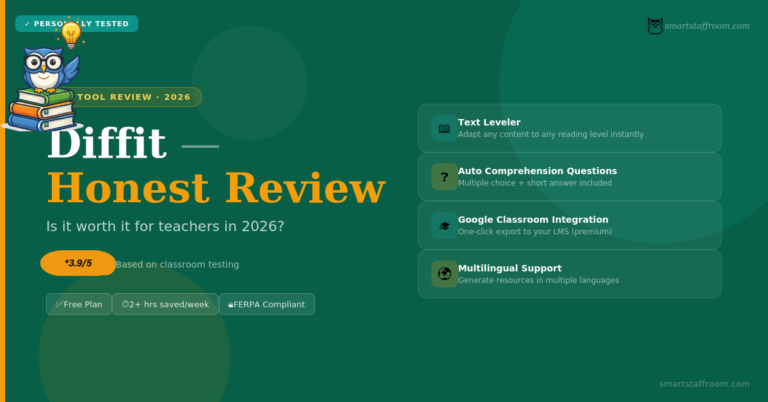
Diffit does one thing exceptionally well — it takes any text, article, URL, or topic and instantly produces a reading resource adapted to your target level, complete with comprehension questions and vocabulary support. The free plan is generous enough for daily use, and the Google Classroom integration means you can push differentiated materials directly to students with one click.
Best Free Features
- Text Leveler — Adapt any content to any reading grade level instantly
- Auto-Generated Questions — Multiple choice and short answer questions included
- Vocabulary Lists — Key terms identified and defined automatically
- Google Classroom Integration — One-click push to your class
- URL Import — Paste any webpage link and Diffit adapts it automatically
✅ Pros
- Incredibly easy to use
- Google Classroom integration
- Saves hours on differentiation
- Free plan is genuinely useful
❌ Cons
- Narrow scope — differentiation only
- Paid plan pricier than competitors
- Less useful for higher education
Canva AI is genuinely free for verified teachers and students through the Canva for Education programme — meaning you get full Pro access including all AI features at no cost. Magic Write drafts text for any resource, Magic Design generates complete presentation layouts from a prompt, and the AI image generator creates custom copyright-free classroom illustrations instantly.
Best Free Features
- Magic Write — AI text generation built directly inside Canva
- Magic Design — Full presentation decks from a single text prompt
- AI Image Generator — Custom classroom illustrations in seconds
- 250,000+ Templates — Worksheets, posters, presentations and more
- Canva for Education — Free Pro access — verify at canva.com/education
✅ Pros
- Genuinely free Pro for teachers
- Beautiful professional outputs
- Huge template library
- No design skills needed
❌ Cons
- AI is a bonus feature not the core
- Verification process takes a few days
- Free image generations are limited
ChatGPT’s free plan is remarkably capable — you get access to GPT-4o which can handle virtually any teaching task you throw at it. The key difference from education-specific tools is that you need to prompt it well to get consistently good results. Once you learn the basics of prompting though, ChatGPT becomes an extraordinarily flexible assistant that no other free tool can match for range.
Best Free Features
- GPT-4o access — The latest model available free with daily limits
- Lesson and unit planning — Detailed multi-week units for any curriculum
- Essay feedback — Personalised student feedback against any rubric
- Parent communication — Professional emails from rough notes in seconds
- Explain anything — Any concept at any level, from Year 3 to university
✅ Pros
- Most versatile free AI tool available
- Works for any subject and level
- No word limits on free plan
- Constantly improving
❌ Cons
- Requires good prompting skills
- Not built specifically for education
- Can occasionally give inaccurate info
Eduaide.AI offers over 110 different types of educational resources — more than any other tool on this list. From graphic organizers and games to detailed lesson plans and differentiated worksheets, if you need to create a classroom resource Eduaide almost certainly has a template for it. It is built by educators with 36+ years of classroom experience baked into the design.
Best Free Features
- 110+ resource types — The largest collection of education resource templates available
- Graphic organizers — Visual thinking tools for any topic or concept
- Games and activities — Engaging classroom activities generated in seconds
- Differentiation tools — Adapt any document to multiple complexity levels
- YouTube integration — Turn any video into an interactive lesson
✅ Pros
- Most resource types of any free tool
- Built by experienced educators
- Research-based pedagogical approach
- YouTube lesson integration
❌ Cons
- Less well known than MagicSchool
- Interface takes time to explore
- Advanced features need school plan
Google NotebookLM is one of the most underused free AI tools in education. Upload any document — a curriculum guide, textbook chapter, research paper, or your own notes — and NotebookLM becomes an AI expert on that specific content. You can ask it questions, generate summaries, create study guides, and even produce audio overviews of complex documents. For curriculum planning and professional development research, it is exceptional.
Best Free Features
- Document Q&A — Ask questions about any uploaded document and get cited answers
- Audio Overviews — Turn any document into a podcast-style audio summary
- Study Guides — Auto-generate structured study guides from any content
- Briefing Documents — Summarise multiple sources into one coherent brief
- Source Citations — Every answer cites the exact source it came from
✅ Pros
- Completely free from Google
- Cited answers — no hallucinations
- Audio overview feature is unique
- Perfect for curriculum research
❌ Cons
- Only works with uploaded documents
- Not for lesson planning directly
- Requires Google account
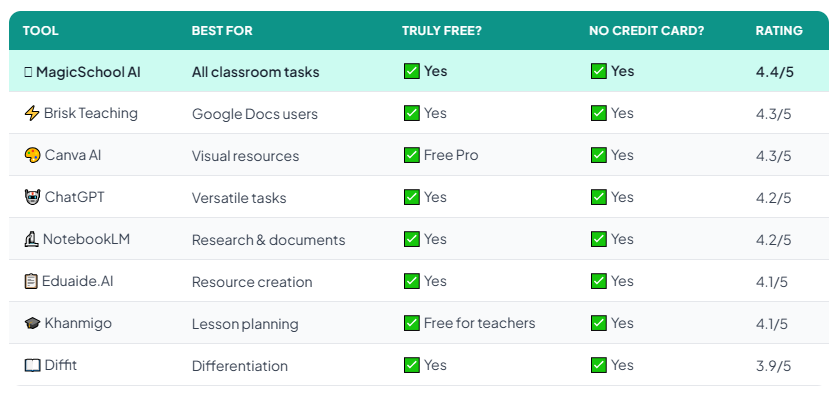
Quick Comparison — All 8 Free Tools at a Glance
Here is how all eight tools compare side by side:
Which Free Tool Should You Start With?
If you want our honest recommendation — start with MagicSchool AI and add Canva AI for visual resources. That combination covers 90% of what most classroom teachers need from AI, and both are completely free.
If you are already comfortable with AI and use Google Workspace daily — add Brisk Teaching as a Chrome extension. It works inside the tools you already have open so there is zero extra friction in your workflow.
If your biggest challenge is creating differentiated materials for mixed ability groups — go straight to Diffit first. It solves that specific problem better than anything else on this list.
Frequently Asked Questions
Start Saving Time Today — For Free 🦉
Sign up for MagicSchool AI and run your next lesson plan through it. You will see the difference within 10 minutes — and it will not cost you a penny.
Try MagicSchool AI Free → See Our Full Rankings🦉 Join 1,000+ Educators
Weekly AI tool reviews · Free resources · No spam
By subscribing you agree to receive weekly emails from Smart Staff Room. Unsubscribe anytime.
Last updated: March 2026.