“This post contains affiliate links. If you click and make a purchase we may earn a small commission at no extra cost to you. We only recommend tools we genuinely believe in.”
9 Best AI Tools for University Lecturers in 2026 — Research, Teaching & Grading
University lecturers face a uniquely demanding workload — research, teaching, assessment, administration, and publication — all simultaneously. AI tools are now capable of making a genuine difference across every one of these areas. Here are the 9 best, honestly tested for higher education in 2026.
Most AI tool guides for educators focus on K-12. University lecturers have completely different needs — systematic literature reviews, large cohort grading, lecture capture and transcription, academic writing support, and research workflows that K-12 tools simply do not address. This guide is written specifically for higher education.
We have organised the tools by the area of your work they address most — research, teaching, assessment, and productivity — so you can find what you need quickly.
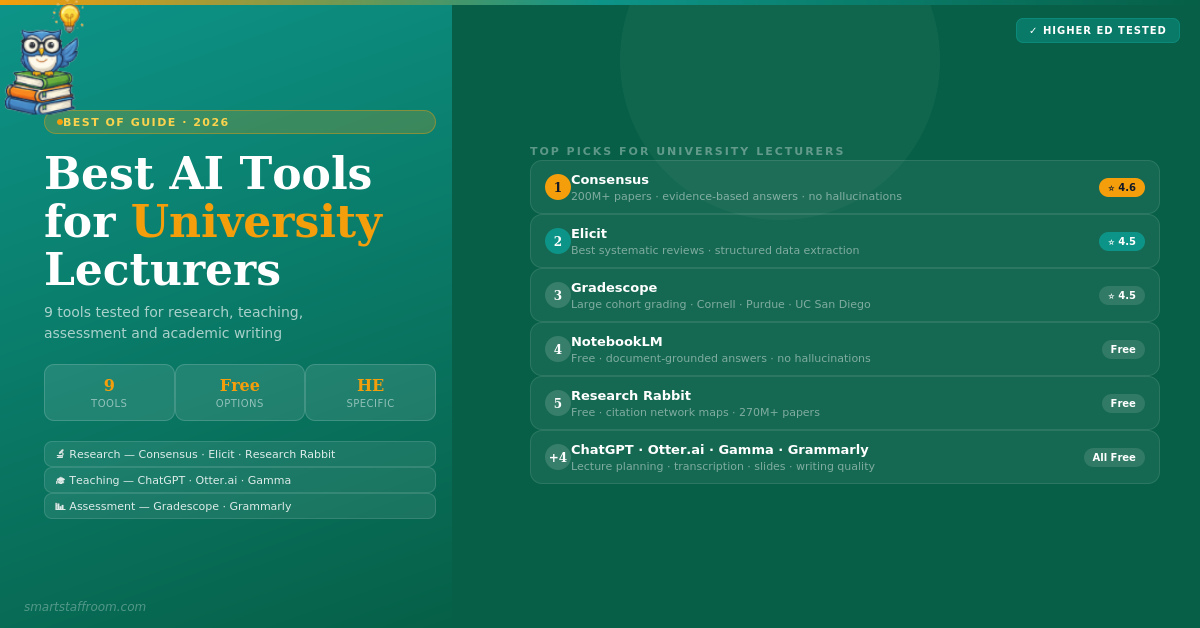
Consensus is the most important AI research tool for university lecturers who need evidence-based answers quickly. Ask it a research question — “Does retrieval practice improve long-term retention?” — and it searches 200M+ peer-reviewed papers, extracts the relevant findings, and shows you a Consensus Meter indicating whether the scientific community broadly agrees, disagrees, or is divided. Every answer is cited. No hallucinations — only findings grounded in actual published research.
For lecturers this is transformative in two ways. For research, it dramatically accelerates the evidence-gathering phase of any project. For teaching, it lets you check the evidence base behind any claim you plan to make in a lecture in seconds — and find supporting citations to share with students. Researchers consistently report cutting literature review time by 60–70%.
- 200M+ paper index — peer-reviewed only, no low-quality sources
- Consensus Meter — visual indicator of whether evidence agrees, disagrees, or is mixed
- Cited answers only — every claim linked to the source paper
- Evidence synthesis — summarises findings across multiple studies
- Study snapshots — quick summaries of individual papers without reading in full
- Best for health, psychology, social sciences — strong coverage across disciplines
✅ Pros
- Best tool for evidence-based questions
- No hallucinations — peer-reviewed only
- Consensus Meter is genuinely useful
- Dramatically speeds up literature grounding
❌ Cons
- Primarily English-language papers
- Less useful for humanities and arts
- Free plan has limited monthly searches
Elicit is the power tool for researchers conducting systematic literature reviews. While Consensus answers questions, Elicit manages entire research workflows — finding papers, screening them against inclusion criteria, and extracting structured data across hundreds of studies simultaneously. Define the columns you need — sample size, methodology, key findings, limitations — and Elicit extracts them into a spreadsheet across every relevant paper. What used to take weeks takes hours.
The structured data extraction capability is Elicit’s unique strength. For lecturers supervising postgraduate research or conducting their own systematic reviews, it eliminates the most time-consuming manual work. Every AI-generated claim is cited with sentence-level citations from the source paper, dramatically reducing the risk of hallucination compared to general AI tools.
- Structured data extraction — extracts specific data points across hundreds of papers simultaneously
- Semantic search — finds relevant papers even without exact keyword matches
- Inclusion/exclusion screening — automates the screening phase of systematic reviews
- Sentence-level citations — every AI claim linked to the exact source sentence
- Concept mapping — visualises how papers relate and identifies research gaps
- Paper discovery — suggests related papers based on citation networks
- 138M+ papers indexed — including 545K+ clinical trials
✅ Pros
- Best systematic review tool available
- Structured data extraction is unique
- Sentence-level citations throughout
- Cuts review time by 60-70%
❌ Cons
- Steeper learning curve than Consensus
- ~90% extraction accuracy — verify critical data
- Free plan is very limited
NotebookLM is the best free AI tool for university lecturers because it solves the trust problem. Instead of answering from vague training data, it grounds all outputs in the documents you upload — your research papers, lecture slides, textbooks, policy documents. Ask it to explain a concept from your uploaded readings, identify contradictions across sources, generate discussion questions based on your course materials, or produce a study guide from your lecture notes. Every answer is cited against your specific uploaded documents.
The Audio Overview feature is particularly innovative for lecturers — it converts uploaded academic papers or course materials into podcast-style conversations that summarise the key points. Lecturers at the University of California, Riverside are using it to help students “debate” with the AI about their own submitted papers to identify weaknesses in their arguments — a genuinely novel pedagogical application.
- Document-grounded answers — outputs based only on your uploaded materials, not training data
- Audio Overview — converts dense papers into podcast-style summaries
- Discussion question generation — from your actual course readings
- Research gap identification — across your uploaded literature
- Study guide creation — from your lecture notes and slides
- Mind map generation — visualises concepts from uploaded materials
- Completely free — just a Google account needed
✅ Pros
- Completely free — always
- No hallucinations — document-grounded only
- Audio Overview is genuinely useful
- Perfect for lecture preparation
❌ Cons
- Limited to your uploaded documents — no internet search
- File size limits apply
- Less powerful for discovery than Consensus or Elicit
ChatGPT is the most versatile tool for university lecturers because it handles the full breadth of higher education tasks — from drafting lecture outlines and creating case studies to writing assessment rubrics and drafting student feedback. Unlike K-12 tools, it handles the academic complexity, subject-matter depth, and professional tone that university teaching requires. The ability to upload documents and PDFs in the paid version makes it especially powerful for working with your own course materials.
- Lecture outline creation — structured outlines for any topic at any level
- Case study generation — contextualised scenarios for seminar discussion
- Assessment rubric design — detailed marking criteria for any assignment type
- Student feedback drafting — constructive feedback from your notes
- Reading list curation — suggested readings with rationale
- Document analysis — upload PDFs and ask questions about them
- Academic writing support — drafting, editing, and structuring academic text
✅ Pros
- Handles complex academic content well
- Most flexible tool available
- Document upload capability (Plus)
- Free plan is very capable
❌ Cons
- Can hallucinate citations — never use for research without verification
- Requires good prompting for best results
- Not built for education specifically
Otter.ai is essential for university lecturers who want accurate transcriptions of their lectures, seminars, and meetings without manual effort. It records and transcribes in real time, identifies different speakers, and produces searchable text that students can use as an accessibility aid or study resource. The AI-generated summaries and action items mean meeting notes from committee work, supervision sessions, and departmental meetings are produced automatically.
- Real-time transcription — converts speech to text live as you lecture
- Speaker identification — tracks who said what in seminars and meetings
- AI summaries — key takeaways from any recorded session
- Searchable archive — find specific topics across all your recordings
- Zoom/Teams integration — automatically joins and records online sessions
- Accessibility support — provides lecture transcripts for students who need them
- 300 free minutes/month — enough for regular use on free plan
✅ Pros
- Best transcription accuracy available
- Automatic Zoom/Teams integration
- Excellent for student accessibility
- 300 free minutes is genuinely useful
❌ Cons
- Accuracy drops with heavy accents and technical jargon
- Free plan limited to 30 minutes per conversation
- Privacy considerations for recording students
Gamma generates complete, well-designed lecture presentations from a topic, outline, or pasted text in under two minutes. For lecturers who dread the hours spent formatting PowerPoint slides, it is a genuine time saver. Enter your lecture topic and key points — Gamma produces a full presentation with structured content, professional layouts, and visuals. Export to PowerPoint for further editing or present directly from Gamma.
- Complete slide decks from text — topic to presentation in under 2 minutes
- Professional academic templates — appropriate for university settings
- PowerPoint export — edit further in your existing workflow
- Paste your notes — converts lecture notes directly into slides
- Image generation — creates relevant visuals for content automatically
- Collaborative editing — share and edit with colleagues
✅ Pros
- Fastest presentation creation available
- Professional-quality output
- PowerPoint export — no lock-in
- Great for conference presentations
❌ Cons
- Less control over fine design details
- Free plan limited by credits
- Content still needs academic review
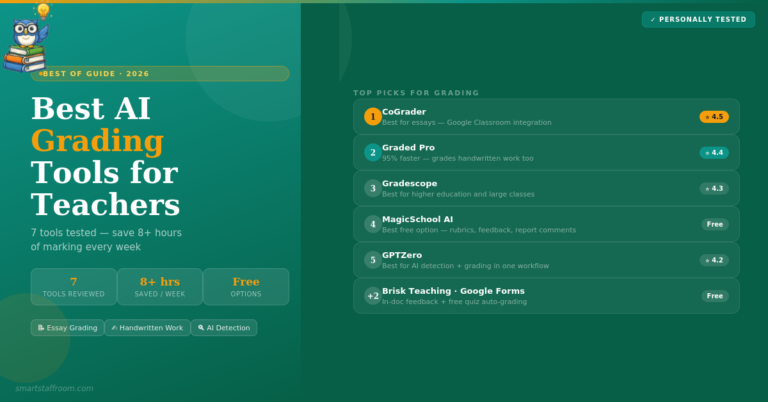
Gradescope is the most widely adopted AI grading platform in higher education and the gold standard for large cohort assessment. Its AI groups similar student answers together — allowing instructors to grade a single rubric criterion across all students simultaneously rather than student by student. For a cohort of 200 students, this alone can cut grading time by 60–70%. It handles essays, short answers, PDFs, programming assignments, and bubble sheets, and supports both paper-based and digital submissions.
- AI answer grouping — grade each criterion across all students simultaneously
- All assignment types — essays, code, PDFs, bubble sheets, handwritten work
- Turnitin integration — plagiarism checking within the same platform
- LMS integration — Canvas, Blackboard, Moodle and more
- Per-question analytics — identifies which questions students struggled with most
- Paper-based support — students scan handwritten work via PDF upload
- Flexible rubrics — customise and adjust as you grade
✅ Pros
- Gold standard for large cohort grading
- AI grouping dramatically cuts time
- Widest assignment type support
- Turnitin integration included
- Trusted by top universities worldwide
❌ Cons
- Full pricing requires institutional contact
- Steeper setup than simpler tools
- Less appropriate for small classes
Grammarly is valuable for university lecturers in two distinct ways. For your own academic writing — papers, grant applications, reports — it catches grammatical errors, improves clarity, and helps maintain consistent professional tone across long documents. For student feedback — Grammarly catches errors in your written comments before they reach students, improving the professionalism of your feedback. The Education institutional plan gives all faculty and students access to Pro features.
- Academic writing quality — grammar, clarity, and style for your papers
- Tone detection — ensures feedback and communications strike the right tone
- Works everywhere — Gmail, Word, Google Docs, browser-based tools
- Citation style checking — Pro plan checks citation formatting
- Plagiarism checker — Pro plan scans against billions of sources
- Education institutional plan — contact Grammarly for university pricing
✅ Pros
- Works everywhere you write automatically
- Improves professional writing quality
- Free plan covers everyday needs
- Institutional plans available
❌ Cons
- Not an academic research tool
- Pro features needed for plagiarism checking
Research Rabbit is the best free tool for discovering papers you did not know you were missing. Add papers you already know to a collection and Research Rabbit maps their citation networks — showing you the seminal papers that everything else cites, the most recent papers building on your collection, and unexpected connections between different research clusters. Its algorithm adapts to your reading patterns and generates more relevant recommendations over time. PhD students and professors consistently describe it as the tool that transformed their literature discovery process.
- Citation network visualisation — see how papers relate to each other visually
- 270M+ papers indexed — comprehensive academic coverage
- Seminal paper discovery — finds the foundational work you may have missed
- Recent paper alerts — notified when new papers cite your collection
- Research gap identification — spots understudied areas in your field
- Zotero integration — syncs with your reference manager
- Completely free — no paid tier, always free
✅ Pros
- Completely free — always
- Best paper discovery tool available
- Citation network maps are exceptional
- Zotero integration
- Adapts to your reading patterns
❌ Cons
- Discovery only — not a synthesis tool
- Needs existing papers to start from
- Less useful for very niche fields
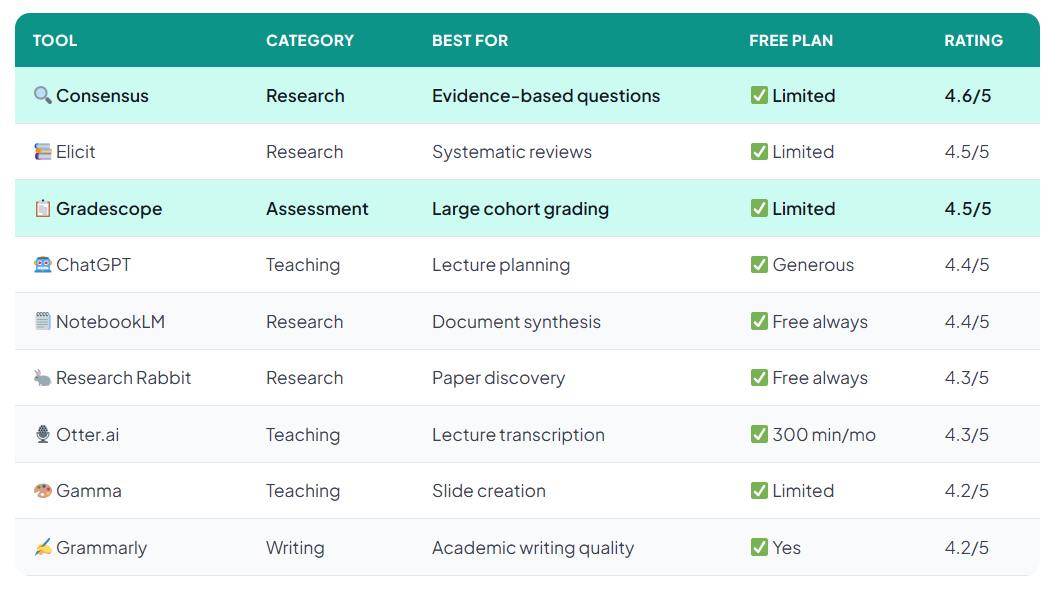
Quick Comparison — All 9 Tools at a Glance
Our Recommended Toolkit by Role
Frequently Asked Questions
Start With Consensus Today 🔬
Search your next research question across 200M+ peer-reviewed papers — with cited, evidence-based answers in seconds. Free to start.
Try Consensus Free → See All Our Top Picks🦉 Join 1,000+ Educators
Weekly AI tool reviews · Free resources · No spam
By subscribing you agree to receive weekly emails from Smart Staff Room. Unsubscribe anytime.
*All tools tested for higher education use cases. Pricing correct as of March 2026. Last updated: March 2026.