“This post contains affiliate links. If you click and make a purchase we may earn a small commission at no extra cost to you. We only recommend tools we genuinely believe in.”
7 Best AI Tools for Special Education Teachers in 2026
Special education teachers carry one of the heaviest administrative loads in teaching — IEP writing, progress monitoring, behaviour plans, caseload management, and differentiated materials for students with vastly different needs. AI tools are beginning to make a real dent in that workload. Here is our honest guide to the best ones in 2026.
Special education teachers spend an average of five hours per week on paperwork alone — time that could be spent supporting students directly. Each IEP is a legal document that takes 5–8 hours to write properly. With a typical caseload of 15 students, that is 75–120 hours of writing per year before a single meeting, intervention, or progress monitoring session.
AI tools cannot replace the professional expertise, legal knowledge, and deep understanding of individual students that special education teachers bring to their work. But they can take on the drafting, structuring, and administrative load — giving teachers more time and cognitive energy for the work that genuinely requires them.
What Makes an AI Tool Good for Special Education?
General AI tools can help with some special education tasks but they were not designed for the specific legal, pedagogical, and ethical requirements of SPED work. The best AI tools for special education teachers are those that understand IEP structure and compliance requirements, produce differentiated materials for a wide range of disability profiles, support behaviour intervention planning, help with progress monitoring, and do all of this without requiring teachers to input sensitive student data.
Every tool in this guide was evaluated against these SPED-specific criteria — not just general teaching usefulness.
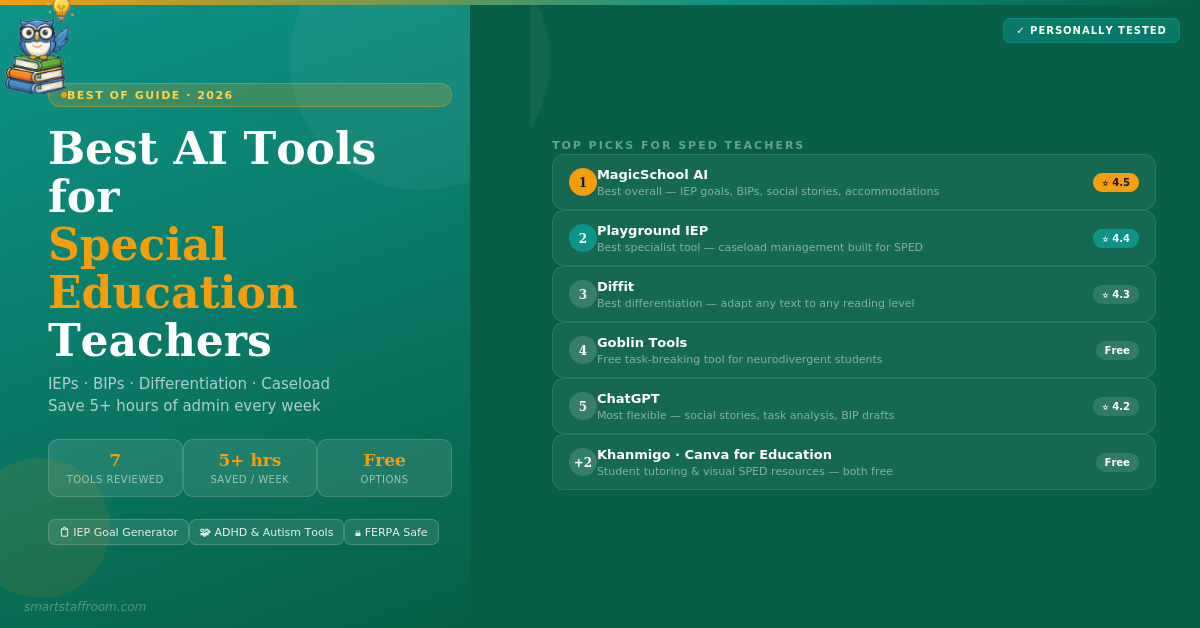
MagicSchool AI is our top overall pick for special education teachers because it has more SPED-specific tools than any other general AI platform. The IEP Goal Generator, Accommodation Generator, Behaviour Intervention Plan helper, differentiation tools, and progress monitoring support all sit in one FERPA-compliant platform — making it the single most useful tool for reducing administrative load in special education.
The IEP Goal Generator is particularly strong — input the student’s disability category, current performance level, and the skill area you are targeting, and MagicSchool generates SMART IEP goals that are measurable, standards-referenced, and legally appropriate. These are starting points that you then individualise — but starting from a well-structured draft rather than a blank page cuts drafting time by 30–50%.
Key SPED Features
- IEP Goal Generator — SMART goals by disability category, grade level, and skill area
- Accommodation Generator — appropriate accommodations based on disability and challenges
- Behaviour Intervention Plan helper — intervention strategies and replacement behaviours
- Differentiated lesson plans — adapted to any ability level with Bloom’s Taxonomy built in
- Visual schedule creator — printable visual schedules for structured classrooms
- Social story generator — tailored social stories for specific situations and students
- Parent communication tools — professional IEP update letters and meeting summaries
- Progress monitoring templates — aligned with IEP goals and state standards
- Multilingual parent communication — translate communications for non-English families
- FERPA compliant — safe for school use with student-related content
✅ Pros
- Most complete SPED toolkit available
- IEP Goal Generator is excellent
- Social story generator saves hours
- FERPA compliant
- Generous free plan
❌ Cons
- Not a specialist IEP platform
- Goals need individualisation — not final drafts
- Free plan has daily limits
Playground IEP is the most specialised AI platform built exclusively for special education. Unlike general tools that have added IEP features, Playground IEP was designed from the ground up for SPED teams. It sits between the student information system and IEP software, replacing the chaotic spreadsheets that most special education teachers use to manage their caseloads.
The disability impact statement generator, BIP writer, MTSS intervention creator, and progress monitoring assessment generator are all built around SPED-specific workflows that general AI tools simply do not understand. For special education teachers managing large caseloads, the caseload management features alone make it worth exploring.
- IEP Goal Generator — measurable goals aligned to state standards
- Disability Impact Statement — articulates how disability impacts learning with tailored accommodations
- BIP Writer — comprehensive behaviour intervention plans with strategies and replacement behaviours
- MTSS Intervention Creator — Tier 1, 2, and 3 interventions for student growth
- Progress Monitoring Assessments — aligned with IEP goals and state standards
- Differentiated Lesson Plans — adapted to every student’s level with Bloom’s Taxonomy
- Caseload Management — replaces chaotic spreadsheets with organised, visual interface
- IEP Snapshots — actionable summary of each student’s IEP for gen ed teachers
- Testing Accommodation Generator — appropriate accommodations for assessments
- IEP Meeting Scheduler — automates scheduling and reevaluation tracking
✅ Pros
- Purpose-built for special education
- Best caseload management available
- BIP and MTSS tools are excellent
- Replaces messy spreadsheets
- Free tools available to try
❌ Cons
- Less well known than MagicSchool AI
- Full platform is paid
- Primarily US-focused
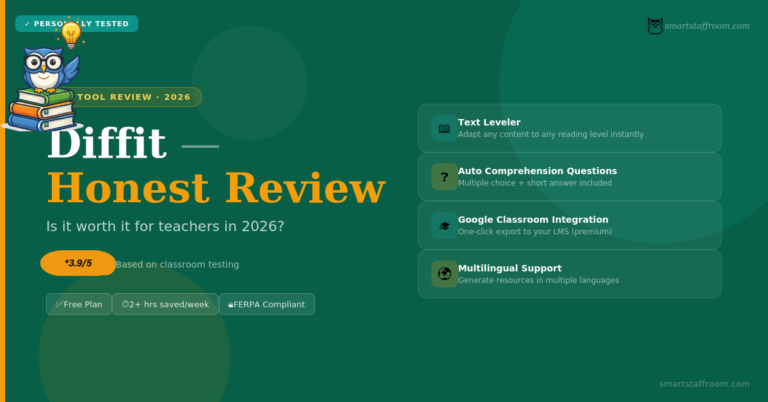
Diffit is invaluable in special education classrooms because it solves the most persistent challenge — adapting grade-level content for students who are reading significantly below grade level. Rather than removing students from grade-level curriculum, Diffit adapts the same content to the student’s reading level while preserving the core concepts and learning objectives. This supports inclusion by keeping SPED students connected to what the rest of the class is learning.
- Reading level adaptation — adapt any text to any level while preserving core content
- Automatic vocabulary support — key terms identified and defined at the right level
- Comprehension questions — automatically generated and levelled
- Multilingual support — generate materials in students’ home languages
- FERPA and COPPA compliant — zero student data collected
- Credible cited sources only — no hallucinated facts in student materials
✅ Pros
- Best tool for reading-level adaptation
- Supports inclusion — same content, different level
- FERPA and COPPA compliant
- 60-day free premium trial
❌ Cons
- Not SPED-specific beyond differentiation
- Google Classroom export is premium only
Goblin Tools is a collection of free, simple AI tools designed specifically to support neurodivergent users — including students with ADHD, autism, and executive function challenges. The flagship tool is the Magic ToDo, which takes any task and breaks it down into small, manageable steps automatically. For students who are overwhelmed by multi-step tasks, this is genuinely life-changing.
The Judge tool helps students understand the tone of messages they have received — particularly valuable for autistic students who struggle with reading social cues in written communication. The Formaliser rewrites casual text in more appropriate language. The Estimator helps with time management by estimating how long tasks will take. All of these address the exact executive function and social communication challenges that SPED students frequently face.
- Magic ToDo — breaks any task into small manageable steps for students who feel overwhelmed
- Judge — analyses tone of messages to help students understand social communication
- Formaliser — rewrites casual text in more appropriate, formal language
- Estimator — helps students understand how long tasks will realistically take
- Compiler — turns bullet points and notes into coherent paragraphs
- Completely free — no account, no subscription, no cost
- Simple interface — designed to be low-friction for users who find technology overwhelming
✅ Pros
- Completely free — always
- Purpose-built for neurodivergent users
- Students can use independently
- Task breakdown feature is exceptional
- No account needed
❌ Cons
- Student-facing — not a teacher planning tool
- Simple single tasks only — no caseload management
- Limited to its specific tool set
ChatGPT is the most flexible tool for custom special education materials — particularly for unusual cases, complex disability profiles, or tasks that dedicated SPED tools do not cover well. Social stories for specific situations, adapted materials for unique learning profiles, custom visual schedule scripts, and first drafts of difficult parent communications are all areas where ChatGPT’s flexibility is invaluable.
- Social story creator — tailored to specific situations with appropriate language and format
- IEP goal drafting — SMART goals for any disability category and skill area
- Behaviour strategy suggestions — research-informed approaches by behaviour type
- Adapted materials — simplify any content for any ability level
- Parent communication drafting — professional letters for difficult conversations
- Visual schedule scripts — step-by-step descriptions for classroom routines
- Task analysis — break any skill into teachable steps
✅ Pros
- Most flexible for custom SPED content
- Social story generator is excellent
- Free plan is very capable
- Task analysis is fast and detailed
❌ Cons
- No SPED-specific features built in
- Requires careful prompting
- Strict privacy discipline required
- Not FERPA compliant as a general tool
Khanmigo is particularly well-suited for special education contexts because its Socratic approach — guiding students through problems rather than giving answers — aligns well with the goal of building genuine independence in SPED students. For students who have learned to rely on adult prompting, having an AI that responds with questions rather than solutions supports the development of self-regulated learning skills. The free teacher tools also include IEP-aligned goal support and progress summaries.
- Socratic tutoring — guides students without creating dependence on immediate answers
- Free for teachers — lesson plans, rubrics, exit tickets, progress summaries
- FERPA and COPPA compliant — safe for student-facing use
- Patient unlimited practice — students can ask the same question repeatedly without judgment
- Khan Academy content — tied to structured curriculum with built-in scaffolding
✅ Pros
- Builds independence not dependence
- Free for teachers
- FERPA and COPPA compliant
- Patient and non-judgmental for students
❌ Cons
- Student access requires district partnership
- May frustrate students who need immediate support
- Not SPED-specific in its features
Canva is particularly valuable for special education teachers because so much SPED practice relies on visual supports — visual schedules, social story illustrations, communication boards, behaviour charts, reward systems, and classroom environment labels. The AI image generator creates custom, age-appropriate illustrations for any specific scenario, which general stock libraries often cannot provide. Create exactly the visual schedule or social story illustration you need rather than adapting something that is close but not quite right.
- Visual schedule creator — clear, illustrated daily schedules for structured classrooms
- Social story illustrations — custom AI images for any social scenario
- Communication board templates — AAC-style visual communication supports
- Behaviour chart creator — visually clear reward and tracking systems
- Classroom label maker — visual environment labels for organised SPED classrooms
- Completely free for K-12 — verified teachers get full Pro access at no cost
✅ Pros
- Free for K-12 teachers permanently
- Custom AI images for SPED-specific scenarios
- Visual schedule and social story creation
- No design skills needed
❌ Cons
- Design tool — not an IEP or admin tool
- Not SPED-specific
- Verification takes a few days
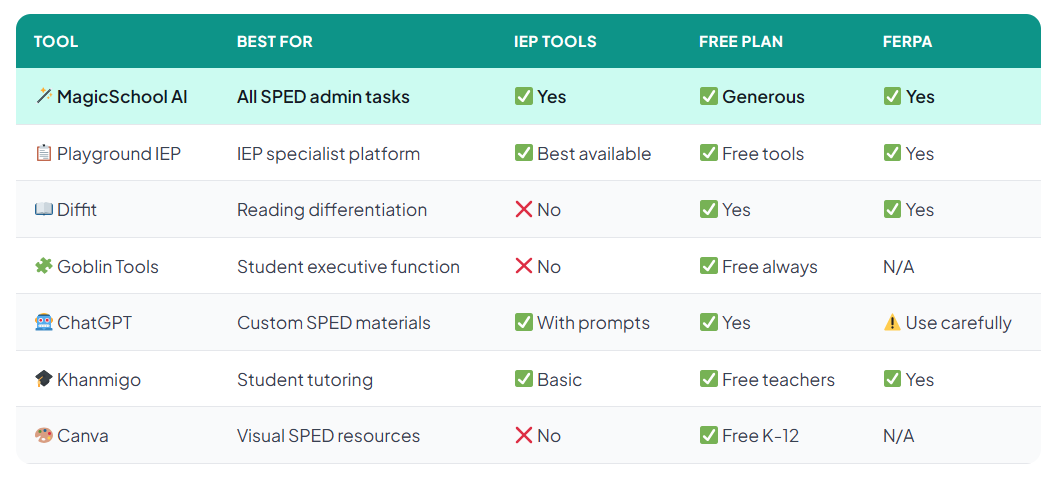
Quick Comparison — All 7 Tools at a Glance
Important Note on AI and IEPs
IEPs are legal documents. Every goal, accommodation, and placement decision must be made by a qualified team with direct knowledge of the student. AI tools can draft, suggest, and structure — but they cannot replace the professional judgment, legal expertise, and personal knowledge of the student that an IEP team brings.
Think of AI as producing a 60–70% first draft that a skilled special education teacher then completes, personalises, and takes responsibility for. The time saving is genuine — but so is the professional responsibility that remains entirely with you.
Frequently Asked Questions
Start With MagicSchool AI Today 🦉
The IEP Goal Generator, social story creator, and accommodation tools are all free. Sign up in 2 minutes and run your next IEP goal through it.
Try MagicSchool AI Free → See All Free AI Tools🦉 Join 1,000+ Educators
Weekly AI tool reviews · Free resources · No spam
By subscribing you agree to receive weekly emails from Smart Staff Room. Unsubscribe anytime.
*All tools personally tested. Privacy guidance reflects best practice as of March 2026 — always verify your school or district’s AI acceptable use policy. Last updated: March 2026.