“This post contains affiliate links. If you click and make a purchase we may earn a small commission at no extra cost to you. We only recommend tools we genuinely believe in.”
8 Best AI Tools for ESL Teachers in 2026 — Honestly Tested
ESL teaching presents a unique set of challenges that general AI tools are simply not built for — pronunciation coaching, CEFR-level differentiation, multilingual support, reading adaptation, and speaking practice at scale. This guide covers the 8 best AI tools specifically tested for ESL and ELL classrooms in 2026.
Whether you are teaching English as a foreign language in an international school, supporting multilingual learners in a mainstream classroom, or running an ESL programme, the right AI tools can transform what is possible in your lessons. Students can now get pronunciation feedback that would previously have required a one-to-one human tutor. Materials can be adapted to any CEFR level in seconds. Vocabulary lists, reading passages, and comprehension questions can be generated in the student’s home language instantly.
We tested every tool in this guide for ESL-specific use cases. Here is what actually works.
What Makes an AI Tool Good for ESL Teaching?
Not every AI tool is suitable for ESL classrooms. General AI tools like ChatGPT are powerful but require significant prompting expertise to get ESL-specific outputs. The best ESL AI tools have CEFR level awareness built in, support multiple languages, understand the specific challenges of non-native speakers, and produce materials that are genuinely appropriate for language learning — not just watered-down general content.
The tools in this guide were evaluated specifically against ESL needs — pronunciation coaching capability, CEFR alignment, multilingual support, reading level adaptation, vocabulary teaching features, listening skills support, and how well they handle students at different proficiency levels within the same classroom.
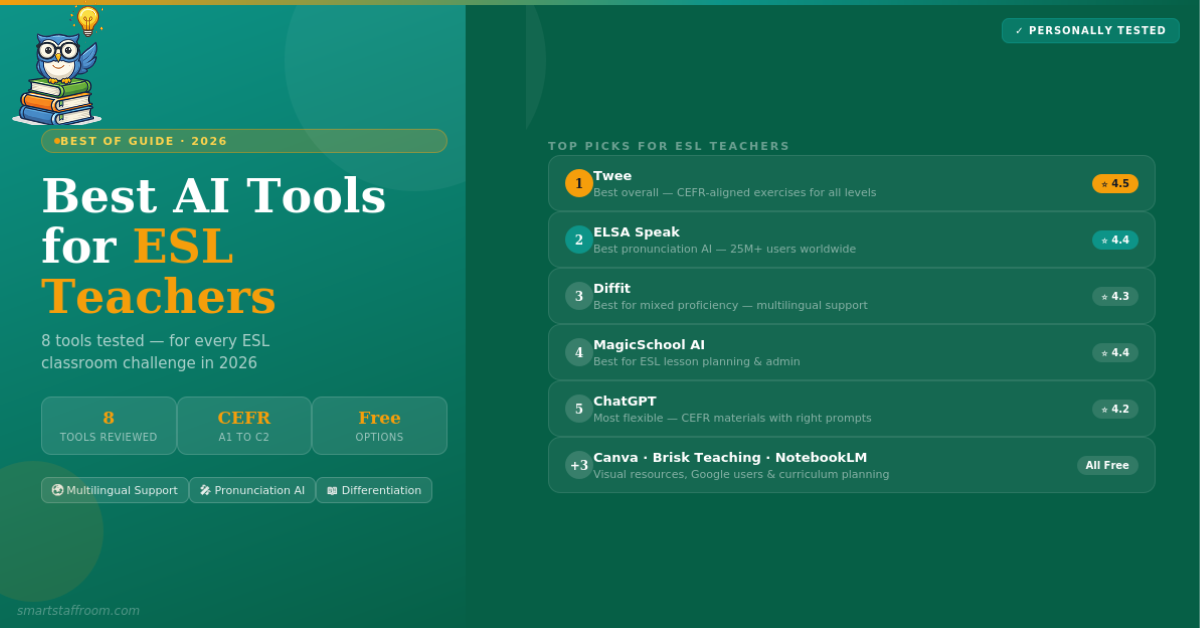
Twee is the standout AI tool for ESL and EFL teachers — it is the only major AI platform built specifically around language teaching. Unlike general AI tools, Twee has dedicated teachers training its AI to align with CEFR standards, which means every output is genuinely calibrated to the correct proficiency level rather than just simplified text.
The range of exercise types is exceptional — gap fills, multiple choice, reading comprehension, dialogue practice, grammar drills, speaking prompts, word-picture matching, text-to-CEFR analysis, and more. You can build an entire lesson around any topic students find engaging — Taylor Swift, football, TikTok, gaming — and Twee generates CEFR-aligned materials around that topic instantly. ESL teachers consistently describe it as genuinely transformative.
- CEFR-aligned exercises — A1 to C2 all levels, accurately calibrated by trained teachers
- 25+ exercise types — gap fills, multiple choice, reading, writing, speaking, listening, grammar
- Topic-based lesson creation — build lessons around any topic students find engaging
- Text-to-CEFR analyser — paste any text and instantly know its proficiency level
- Grammar worksheets — all CEFR levels with explanations and structured practice
- AI assessment tools — automatic grading including open-ended responses
- YouTube video integration — generate comprehension questions from any video
- Student management — organise classes, track progress, assign homework
✅ Pros
- Purpose-built for language teaching
- CEFR alignment is genuinely accurate
- Huge variety of exercise types
- Teachers train the AI — not generic outputs
- Works for all proficiency levels
❌ Cons
- Primarily for language/English teachers
- Less useful for mainstream subjects
- Some advanced features behind paywall
ELSA Speak — English Language Speech Assistant — is the most advanced AI pronunciation coaching tool available and one of the most important additions to any ESL teacher’s toolkit. It gives students immediate, detailed feedback on their pronunciation, intonation, and fluency that would previously have required expensive one-to-one time with a native speaker or trained pronunciation coach.
ELSA’s AI was trained on voice data from non-native English speakers across dozens of accent backgrounds — which means it genuinely understands the pronunciation patterns and errors common to specific first language speakers. A Spanish speaker’s typical errors are different from a Mandarin speaker’s typical errors, and ELSA accounts for this. With over 8,000 lessons and real-time feedback on every attempt, students can practice pronunciation independently anytime — reducing the load on the teacher while dramatically increasing speaking practice time.
- Real-time pronunciation feedback — instant analysis of every sound, word, and sentence
- CEFR level prediction — tracks student progress from A1 to C1
- 8,000+ lessons — covering all 44 English phonemes and prosody features
- IELTS and TOEFL preparation — specific exam pronunciation practice
- Multiple accent options — American, British, Australian and more
- AI conversation practice — roleplay scenarios for real-life situations
- 27 hours = one university ESL course — research-backed effectiveness
- School and class plans — teacher dashboard for monitoring student progress
✅ Pros
- Best pronunciation coaching available
- Students practice independently anytime
- 25M+ users — proven at scale
- Understands non-native accent patterns
- IELTS and TOEFL prep included
❌ Cons
- Student-facing — not a teacher planning tool
- Premium features require subscription
- Focuses on pronunciation — not full language learning
- App-based — requires student devices
Diffit is particularly valuable in ESL contexts because it solves the most common classroom challenge — a single class containing students at wildly different proficiency levels. Paste any text, URL, YouTube video, or PDF and Diffit instantly produces a version adapted to your target level, complete with comprehension questions, vocabulary support, and discussion prompts. For ESL teachers with newcomer students who need grade-level content adapted to beginner English — this is transformative.
The multilingual feature is especially powerful for ESL. Generate a reading passage and vocabulary support in the student’s home language so they can understand the content before engaging with the English version. This bridges the gap for students with very limited English while keeping them connected to grade-level curriculum.
- Instant text leveling — adapt any content to any proficiency level in seconds
- Multilingual support — generate materials in students’ home languages
- Vocabulary support — key terms identified and defined automatically
- Comprehension questions — included automatically with every adapted text
- Works from any source — topic, URL, PDF, YouTube, or pasted text
- FERPA and COPPA compliant — zero student data collected
- Credible sources only — no hallucinated facts in student materials
✅ Pros
- Best differentiation tool for mixed ESL classes
- Multilingual support for newcomers
- Zero student data collected
- Works from any content source
❌ Cons
- Not CEFR-specific — uses general reading levels
- Google Classroom export is premium only
- Individual premium is $14.99/month
MagicSchool AI is the best all-round tool for ESL teacher planning and administration. While not built exclusively for language teaching, its range of 80+ tools covers almost every ESL teaching need — differentiated lesson plans at specified language levels, adapted reading materials, comprehension questions, vocabulary activities, parent communication templates in multiple languages, and IEP goal generators for ELL students with additional needs.
The ELL Support tools specifically are excellent — generate scaffolded materials, sentence frames, and adapted texts with just the learner’s English proficiency level and topic as inputs. The parent communication translator is particularly valuable for ESL teachers in schools with multilingual families.
- ELL differentiation tools — scaffolded materials at any proficiency level
- Multilingual parent communication — translate parent emails and newsletters instantly
- Sentence frame generator — writing scaffolds for language learners
- Vocabulary activity generator — matching, gap fills, and practice activities
- IEP goal generator — for ELL students with additional learning needs
- 80+ teacher tools — covers planning, assessment, and admin
- FERPA compliant — safe for school use
✅ Pros
- Most complete planning toolkit for ESL teachers
- Multilingual parent communication built in
- ELL-specific differentiation tools
- Generous free plan
❌ Cons
- Not CEFR-specific
- Less specialised than Twee for language exercises
- Free plan has daily limits
ChatGPT is the most flexible tool for creating custom ESL materials — particularly for tasks that dedicated tools do not cover well. Creating realistic conversation scripts for roleplay, building custom dialogue scenarios around specific vocabulary sets, adapting authentic texts, generating culturally relevant examples, and creating materials for unusual topics or very specific student contexts are all areas where ChatGPT excels.
The key for ESL use is specifying CEFR level explicitly in every prompt. “Create a B1 level dialogue about ordering food in a restaurant, using the present perfect tense and the following vocabulary: [list]” produces far better results than a vague request. ChatGPT also handles translation and back-translation tasks efficiently — useful for checking if adapted texts are genuinely at the intended level.
- CEFR-specific materials — when you specify the level explicitly in prompts
- Conversation scripts — realistic dialogues for any situation at any level
- 50+ language support — translate and back-translate materials
- Custom vocabulary activities — built around your specific word lists
- Roleplay scenario creator — functional language in context
- Authentic text adaptation — simplify real-world texts to any CEFR level
- Completely free on free plan — GPT-4o at no cost
✅ Pros
- Most flexible for custom ESL materials
- 50+ languages for translation tasks
- Free plan is genuinely capable
- Excellent for dialogue and roleplay scripts
❌ Cons
- Requires prompting skills for best results
- No built-in CEFR alignment — manual specification needed
- Can occasionally hallucinate facts
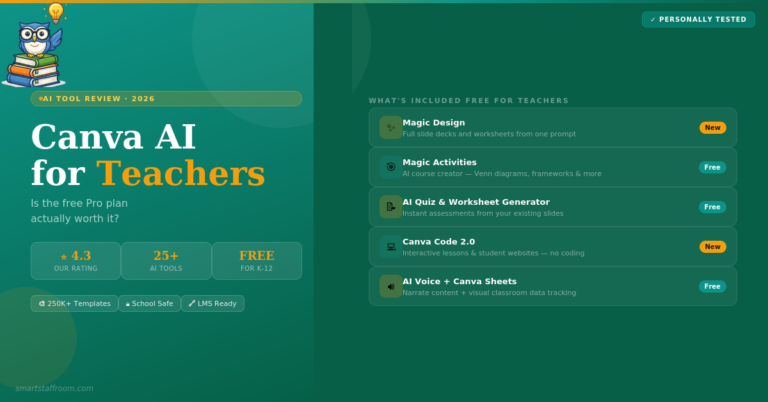
Canva is especially valuable for ESL teachers because language learning is inherently visual. Vocabulary is acquired more effectively when paired with images, and ESL students benefit enormously from visually rich classroom displays, flashcard sets, illustrated worksheets, and graphic organisers. Canva’s AI image generator means you can create custom illustrations for any vocabulary set — matching the exact context of your lesson rather than using generic clip art.
The Magic Design feature generates complete visual worksheets and presentations from a single text prompt. For ESL teachers this means a vocabulary worksheet with illustrations, a dialogue practice sheet, or a grammar reference poster can be generated in seconds. All completely free for verified K-12 teachers.
- AI image generator — custom illustrations for any vocabulary set
- 250,000+ templates — including thousands for language learning
- Flashcard creator — visual vocabulary flashcards for any word set
- Magic Design — complete visual worksheets from a prompt
- Classroom display creator — word walls, vocabulary posters, grammar charts
- Free for K-12 teachers — permanently and unconditionally
✅ Pros
- Free for K-12 — permanently
- Best visual resource creation available
- Custom AI illustrations for vocabulary
- Huge template library
❌ Cons
- Design tool — not an ESL specialist
- No CEFR alignment
- Verification takes a few days
Brisk Teaching is the best option for ESL teachers who are fully embedded in the Google ecosystem. As a Chrome extension it works directly inside Google Docs, YouTube, online textbooks, and PDFs — meaning you can adapt any content for ESL learners without switching tabs. Turn any YouTube video into an ESL lesson with comprehension questions and vocabulary support with one click. Simplify any webpage or article to a target reading level instantly. Generate differentiated Google Classroom assignments without leaving your browser.
- Works inside Google Docs — adapt ESL materials without switching apps
- YouTube to ESL lesson — comprehension questions from any video in one click
- Reading level adjustment — simplify any webpage for language learners
- Google Classroom integration — push differentiated assignments directly
- 93% privacy rating — among the highest in EdTech
✅ Pros
- Works inside your existing tools
- Excellent privacy rating
- YouTube to lesson feature saves huge time
- Strong free plan
❌ Cons
- Chrome only
- Best with Google Workspace
- No CEFR-specific features
Google NotebookLM has a specific use case for ESL teachers that is often overlooked — authentic text analysis and curriculum planning. Upload your course materials, textbook chapters, or exam syllabuses and NotebookLM becomes an AI expert on that specific content. Ask it to generate discussion questions, identify key vocabulary from a reading, create comprehension activities, or plan a scheme of work — all grounded in your actual curriculum documents rather than generic outputs.
- Document-grounded outputs — based on your uploaded curriculum materials
- Vocabulary extraction — identify key terms from any authentic text
- Comprehension question generator — from your own uploaded reading materials
- Audio overview — turn curriculum documents into podcast-style summaries
- Completely free — just a Google account required
✅ Pros
- Completely free — always
- Works from your own documents
- No hallucinations — cited sources
- Excellent for curriculum planning
❌ Cons
- Needs uploaded documents to function
- Less useful for live classroom activities
- No CEFR alignment features
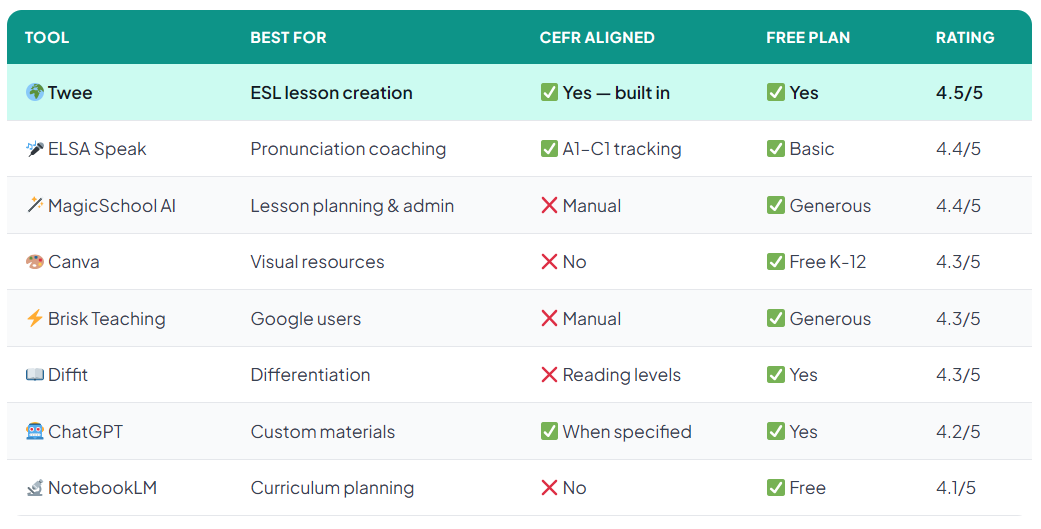
Quick Comparison — All 8 Tools at a Glance
Our Recommended ESL AI Toolkit
You do not need all 8 tools. Here is the minimum viable toolkit for different ESL contexts:
If you teach pronunciation-heavy classes or have students preparing for IELTS or TOEFL — add ELSA Speak as a student homework tool. If you are embedded in Google Classroom — add Brisk Teaching as a Chrome extension. If you need visual resources — Canva for Education is free and excellent.
Frequently Asked Questions
Start With Twee Today 🌍
Sign up free and create your first CEFR-aligned ESL lesson in under 5 minutes. No credit card needed.
Try Twee Free → See All Free AI Tools🦉 Join 1,000+ Educators
Weekly AI tool reviews · Free resources · No spam
By subscribing you agree to receive weekly emails from Smart Staff Room. Unsubscribe anytime.
*All tools personally tested. Pricing correct as of March 2026. Last updated: March 2026.