“This post contains affiliate links. If you click and make a purchase we may earn a small commission at no extra cost to you. We only recommend tools we genuinely believe in.”
7 Best AI Grading Tools for Teachers in 2026 — Honestly Tested
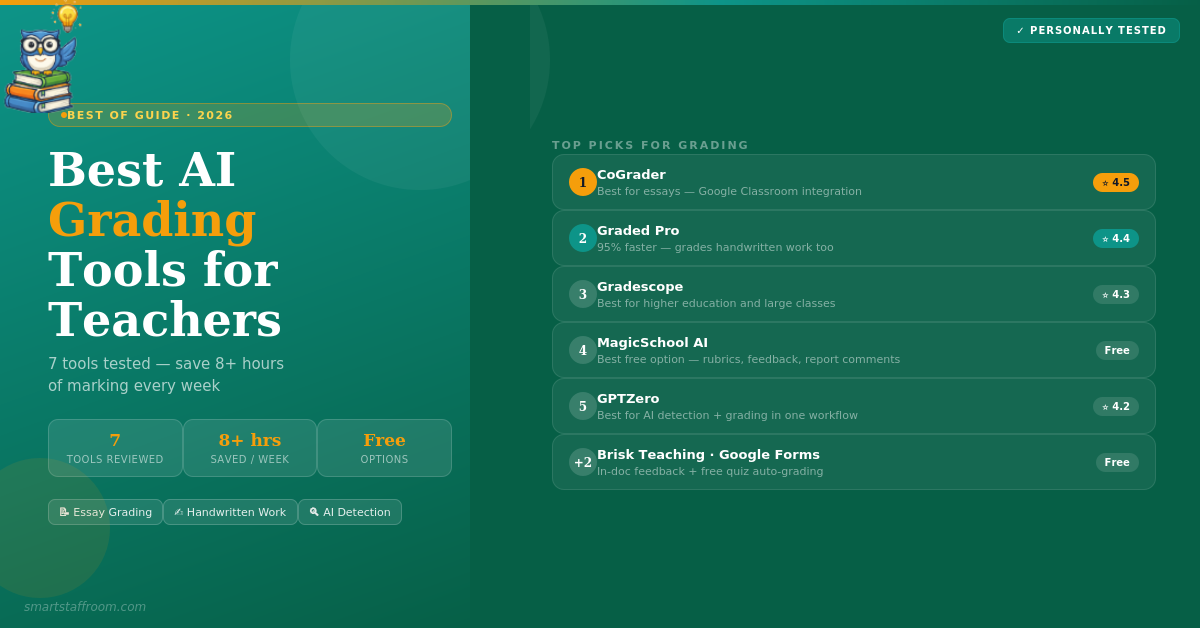
Grading is consistently cited as one of the most time-consuming teaching tasks — and the one teachers most want to get back time on. AI grading tools are now capable enough to make a genuine difference. Here are the 7 best in 2026, honestly tested.
Teachers spend an average of 8+ hours per week on grading and marking. Multiply that across a career and it represents thousands of hours — time that could be spent with students, planning better lessons, or simply not burning out. AI grading tools have matured significantly in the past two years and the best ones now genuinely cut marking time by 70–95% while maintaining or improving feedback quality.
This guide covers the 7 best AI grading tools available in 2026 — what they do, who they are best for, and whether the free plans are actually enough.
What to Look for in an AI Grading Tool
Not all AI grading tools are equal. Before choosing one, consider these key factors that separate genuinely useful tools from ones that create more work than they save.
✅ Must Have
- Custom rubric support
- LMS integration (Google Classroom, Canvas)
- Teacher review before grades are released
- Clear feedback students can act on
- Student data privacy protection
- Works for your assignment types
⚠️ Watch Out For
- Tools that release grades without teacher review
- No rubric customisation
- Manual file upload only — no LMS integration
- Vague feedback students can’t act on
- Unclear data privacy policies
- Accurate for multiple choice only
CoGrader is our top pick for teachers who assign a lot of written work. It integrates directly with Google Classroom, Canvas, and Schoology — pulling in student submissions automatically without any manual file upload. Apply your rubric, and CoGrader generates personalised, passage-specific feedback for every student in seconds. Teachers review the AI feedback, adjust anything they want, and push it back to students through their LMS with one click.
What separates CoGrader from competitors is the quality of feedback it produces. It does not just assign a score — it provides detailed, actionable comments that reference specific parts of the student’s work. Teachers who score AP exams consistently rate its accuracy as the best available. The built-in AI detection and plagiarism screening flag potential integrity concerns within the same grading workflow.
- Direct LMS integration — pulls submissions automatically from Google Classroom, Canvas, Schoology
- Custom rubric support — import your own, choose from state/AP/IB library, or generate one
- Passage-specific feedback — comments reference specific parts of each student’s work
- One-click return — push graded work back to students through LMS instantly
- AI detection built in — flags potential AI-generated content within the grading workflow
- Plagiarism screening — checks for copied content without switching tools
- Class analytics — identifies class-wide weaknesses to inform next lesson
- Multi-language support — grades assignments in any language
- 100 essays/month free — generous free tier for individual teachers
✅ Pros
- Best feedback quality for written work
- Seamless LMS integration
- AI detection built into workflow
- 100 free essays per month
- Teacher always reviews before release
❌ Cons
- Written assignments only — not multiple choice
- Needs clear rubric context to perform well
- Paid plan needed for heavy users
Graded Pro claims up to 95% reduction in marking time — and in testing this is not hyperbole for certain workflows. What makes it stand out is breadth: it grades typed and handwritten work across all subjects, handles scanned paper submissions, and supports the widest range of curricula of any tool on this list — including Common Core, AP, IB, GCSE, and A Level. For international schools or teachers working across multiple curriculum frameworks this is uniquely valuable.
The handwriting recognition capability is genuinely impressive — it converts messy student handwriting into clearly typeset text before grading, including complex maths proofs and diagrams. Teachers can also add voice and text annotations directly onto student work. Students submit through Google Classroom, the Graded Pro mobile app (by scanning a QR code), or the web portal — making it flexible for both digital and paper-based classrooms.
- Handwritten work support — grades scanned handwritten assignments including maths proofs
- All subjects supported — maths, sciences, humanities, English, art, coding and more
- Multiple curricula — Common Core, AP, IB, GCSE, A Level and more
- Mobile app submission — students scan and submit handwritten work via QR code
- Voice and text annotations — teachers add feedback directly onto student work
- Google Classroom integration — automatic submission retrieval
- Consistent standards — same rubric applied to every student without bias
- 150 free credits on signup — enough to test with a real class set
✅ Pros
- Handles handwritten work — unique capability
- Broadest curriculum support available
- 95% marking time reduction possible
- Works for all subjects
- Voice annotation feature excellent
❌ Cons
- Credit-based pricing can add up for heavy users
- Less established than CoGrader for essay feedback
- Mobile app required for handwritten submissions
Gradescope is the most established AI grading platform in higher education and is trusted by thousands of universities globally. It handles the widest range of assignment types of any tool on this list — essays, short answers, PDFs, programming assignments, and bubble sheets. The AI groups similar student responses together so teachers can grade a single rubric criterion across all students simultaneously rather than grading one student at a time — dramatically reducing time for large cohorts.
- Group similar responses — grades the same criterion across all students simultaneously
- Multiple assignment types — essays, code, PDFs, bubble sheets, short answers
- Paper-based support — students scan and upload handwritten work
- Major LMS integration — Canvas, Blackboard, Moodle, and more
- Detailed analytics — question-level performance data for the whole cohort
- Turnitin integration — plagiarism checking within the same platform
✅ Pros
- Most established platform for higher ed
- Widest assignment type support
- Brilliant for large cohorts
- Turnitin integration included
❌ Cons
- Primarily higher education focused
- Full pricing requires institutional contact
- Steeper learning curve than K-12 tools
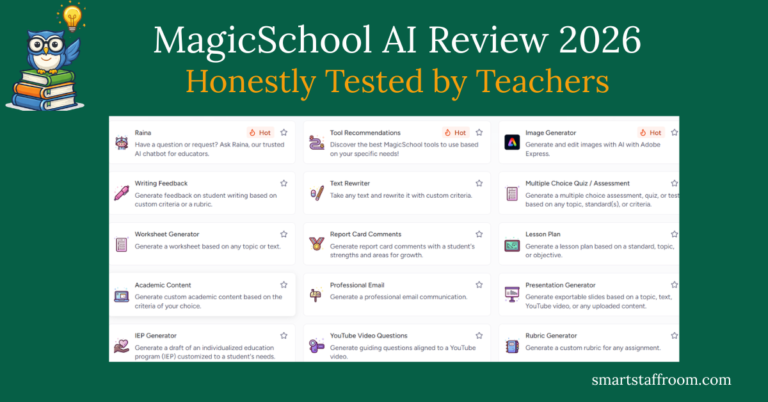
MagicSchool AI is not a dedicated grading platform but its feedback and assessment tools are excellent and completely free. The Student Feedback Generator produces detailed, rubric-aligned feedback on student work. The Rubric Maker creates professional marking rubrics from your assignment description in seconds. The Exit Ticket Analyser helps you interpret class-wide formative assessment results to plan your next lesson. Together these tools cover the most common grading needs without paying for a specialist platform.
- Student Feedback Generator — detailed rubric-aligned feedback from pasted student work
- Rubric Maker — professional rubrics for any assignment in seconds
- Exit Ticket Analyser — interpret formative assessment data to plan next steps
- Report Card Comment Generator — professional, specific comments for any student
- Quiz Generator — create assessments aligned to your learning objectives
- FERPA compliant — safe for school use
- All free on the free plan — no specialist subscription needed
✅ Pros
- Best free grading support available
- Rubric maker is excellent
- 80+ tools beyond grading
- FERPA compliant
- No specialist subscription needed
❌ Cons
- Not a dedicated grading platform
- No direct LMS submission integration
- Manual copy-paste required for student work
GPTZero started as the leading AI detection tool and has expanded into a full AI grading platform. The combination of AI detection and grading in one workflow is genuinely powerful — teachers can check academic integrity and grade work in the same session without switching between tools. The grading tool calibrates to your specific grading style by analysing a sample of submissions you grade yourself, then applies that calibrated standard consistently to the rest of the class.
- AI detection built in — industry-leading detection of AI-generated content
- Calibrated grading — learns your grading style from sample submissions
- Plagiarism checker — compares against web sources and academic databases
- Rubric alignment — grade against your specific criteria
- Detailed feedback — actionable comments beyond just a score
- Saves 8+ hours per week — according to GPTZero’s own teacher data
✅ Pros
- Best AI detection available
- Grading + detection in one workflow
- Calibrates to your grading style
- Generous free plan
❌ Cons
- No direct LMS integration for submissions
- AI detection is never 100% — use as a guide only
- Newer to grading than to detection
Brisk Teaching takes a different approach to AI grading — instead of a separate platform, it works directly inside Google Docs as a Chrome extension. When you open a student’s assignment in Google Docs, Brisk can generate rubric-aligned feedback comments directly in the document, highlight specific passages that need attention, and suggest grades — all without leaving the document you are already reviewing. For teachers fully embedded in Google Workspace this is the most friction-free grading experience available.
- Works inside Google Docs — generate feedback without leaving the student’s document
- Passage-specific comments — highlights and comments on specific text in the document
- Batch feedback — process multiple student submissions at once
- Rubric-aligned grades — apply your criteria to generate suggested scores
- 93% privacy rating — among the highest in EdTech
- Free plan — generous for individual teachers
✅ Pros
- Most seamless workflow for Google users
- No tab switching — works inside Google Docs
- Highest privacy rating of any grading tool
- Batch feedback saves significant time
❌ Cons
- Chrome only — no Firefox or Safari
- Requires Google Workspace
- Less powerful for non-Google workflows
For formative assessment and quiz grading, the most cost-effective combination is Google Forms (which auto-grades multiple choice and short answer instantly) combined with MagicSchool AI for generating the quiz questions and analysing results. Google Forms provides immediate feedback to students the moment they submit, automatically calculates scores, and produces a response summary that identifies the questions students struggled with most — all for free.
- Instant auto-grading — multiple choice and short answer graded the moment students submit
- Immediate student feedback — students see their results and correct answers instantly
- Response summary — see which questions the class struggled with most
- MagicSchool AI quiz generator — creates the questions in seconds from your topic
- Completely free — Google Forms costs nothing, MagicSchool AI free plan included
- Google Classroom integration — assign and collect through Classroom seamlessly
✅ Pros
- Completely free
- Instant grading and feedback
- Class analytics built in
- Students love immediate results
❌ Cons
- Multiple choice and short answer only
- Cannot grade extended writing
- Limited rubric customisation
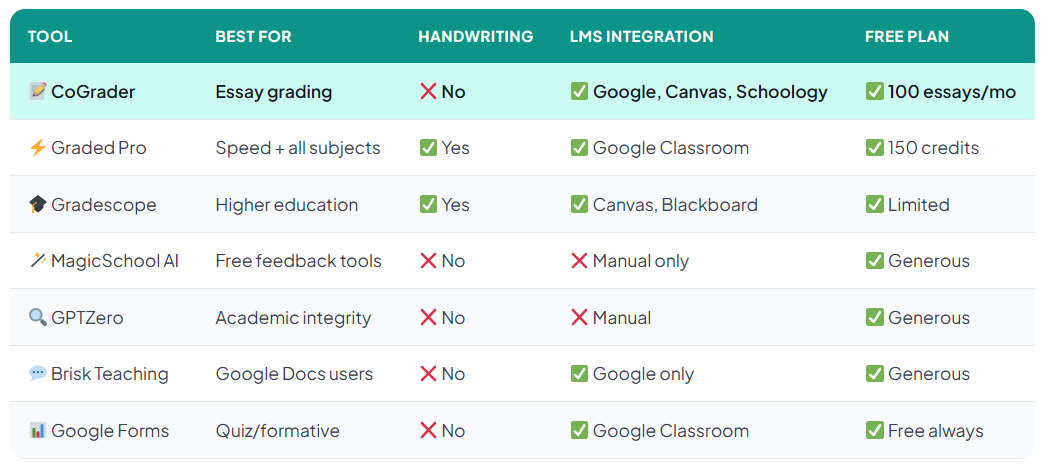
Quick Comparison — All 7 Tools at a Glance
Frequently Asked Questions
Start Saving Time on Grading Today 📝
Try CoGrader free — grade up to 100 essays per month at no cost. Connect your Google Classroom and grade your next assignment in minutes.
Try CoGrader Free → See All Our Top Picks🦉 Join 1,000+ Educators
Weekly AI tool reviews · Free resources · No spam
By subscribing you agree to receive weekly emails from Smart Staff Room. Unsubscribe anytime.
*All tools personally tested. Pricing correct as of March 2026 — verify at each tool’s official website. Last updated: March 2026.