“This post contains affiliate links. If you click and make a purchase we may earn a small commission at no extra cost to you. We only recommend tools we genuinely believe in.”
7 Best AI Tools for Lesson Planning in 2026 — Honestly Tested
Lesson planning is one of the biggest time drains in teaching — and it is exactly where AI tools deliver the most immediate, obvious time savings. This guide covers the 7 best AI tools for lesson planning in 2026, tested by real educators.
According to recent surveys, teachers spend an average of 7–10 hours per week on lesson planning and preparation outside of classroom hours. AI tools for lesson planning are cutting that time dramatically — with many teachers reporting saving 3–5 hours per week on planning alone after integrating just one tool into their workflow.
We tested every tool on this list using real classroom planning tasks across multiple subjects and grade levels. Here is what actually works — and what to avoid.
What Makes a Great AI Lesson Planning Tool?
A great AI lesson planning tool needs to do more than just generate text. It needs to produce outputs that are actually classroom-ready with minimal editing, align to your curriculum standards, understand the difference between grade levels, and fit into your existing workflow without adding friction.
We evaluated every tool against these criteria — ease of use, output quality, curriculum alignment, integration with existing tools, and genuine time savings. Here is what we found.
MagicSchool AI remains our top pick for lesson planning in 2026. Its Lesson Plan Generator produces complete, standards-aligned plans in under 60 seconds — including learning objectives, warm-up activities, main activities, guided practice, independent work, and exit tickets. The key advantage over competitors is the breadth of supporting tools available alongside the lesson planner — differentiation assistants, quiz builders, rubric makers, and more all work together in one platform.
What sets MagicSchool apart for lesson planning specifically is the standards alignment feature. Enter your curriculum standard and the lesson plan automatically aligns every section to that standard. For teachers in standards-heavy systems this alone saves enormous amounts of time checking and adjusting.
Key Lesson Planning Features
- Lesson Plan Generator — Complete plans with objectives, activities, assessments and exit tickets in 60 seconds
- Standards Alignment — Automatic alignment to any curriculum standard you specify
- 5-Day Unit Planner — Full week of connected lessons from a single topic input
- Presentation Generator — Turn your lesson plan into slides automatically
- Worksheet Generator — Supporting materials created alongside the lesson
- Differentiation built in — Generate adapted versions for different learners instantly
✅ Pros
- Most complete lesson planning suite
- Standards alignment built in
- Generous free plan
- No prompting skills needed
❌ Cons
- Free plan hits limits with heavy use
- Some outputs need editing for senior levels
- No offline mode
Brisk Teaching is the best lesson planning tool for teachers already embedded in the Google ecosystem. As a Chrome extension it works directly inside Google Docs, Google Slides, YouTube, online textbooks, and PDFs — meaning you never have to leave the tools you already use. Turn any online article, YouTube video, or PDF into a complete lesson plan with one click. Generate Google Slides presentations, quizzes, rubrics, and worksheets without switching tabs.
The standout lesson planning feature is the ability to turn any content into an interactive lesson. Find a relevant YouTube video or news article and Brisk converts it into a structured lesson with activities, discussion questions, and assessments — all automatically. This is genuinely transformative for teachers who plan lessons around external content.
Key Lesson Planning Features
- Works inside Google Docs — Plan lessons without switching tabs or apps
- Turn any content into a lesson — YouTube videos, articles, PDFs in one click
- Presentation Generator — Editable Google Slides from any online resource
- Quiz Generator — Google Forms quizzes created automatically
- Standards alignment — Align plans to your curriculum standards
- Brisk Next — AI chat for personalised resource recommendations
✅ Pros
- Works inside tools you already use
- Highest privacy rating — 93%
- Turn any content into a lesson
- Outstanding free plan
❌ Cons
- Chrome only — no Firefox or Safari
- Best value with Google Workspace
- Advanced features need school plan
Kuraplan is the most purpose-built AI lesson planning tool on this list — it does not try to be an all-in-one platform. Every feature is designed around lesson planning specifically. Generate comprehensive lesson plans aligned to Common Core Standards in minutes, then turn any lesson plan into a professional slideshow with one click. The one-click worksheet generator produces print-ready materials tailored to your topic and year level instantly.
What makes Kuraplan particularly valuable for school leaders is the visibility it creates — administrators can see what is being taught, when, and how across departments, which supports school-wide alignment and quality improvement. Teachers benefit from the structured planning approach which encourages reflective practice.
Key Lesson Planning Features
- Lesson Plan Generator — Standards-aligned comprehensive plans in minutes
- One-click Slideshow — Turn any lesson plan into a professional presentation instantly
- Worksheet Generator — Print-ready materials tailored to topic and year level
- School-wide visibility — Department coherence and leadership oversight built in
- Curriculum alignment — Common Core and multiple international curricula supported
- Collaborative planning — Share and build on colleagues’ plans
✅ Pros
- Purpose-built for lesson planning
- One-click presentation from lesson plan
- Great for school-wide adoption
- Structured, reflective approach
❌ Cons
- Narrower scope than MagicSchool AI
- Less well known than competitors
- Primarily US curriculum focus
Eduaide.AI offers more lesson planning resource types than any other tool on this list — over 110 different types including lesson plans, graphic organisers, games, assessments, and differentiated materials. Built by educators with 36 years of classroom experience, the platform is grounded in research-based pedagogy. The four-step workflow — choose resource, add context, generate, then refine — is intuitive and produces classroom-ready outputs consistently.
The YouTube integration is a standout feature — Eduaide can transform any YouTube video into a rigorous, interactive lesson with activities grounded in cognitive science and multimedia learning theory. For teachers who regularly use video content in their teaching this is exceptional.
Key Lesson Planning Features
- 110+ resource types — Largest collection of planning templates available
- YouTube lesson creator — Turn any video into a structured interactive lesson
- Document upload — Generate plans from your own existing materials
- Differentiation built in — Adjust complexity and generate adapted versions
- Eduaide Workspace — Edit, refine and personalise outputs before exporting
- Research-based approach — Built on 36 years of educator expertise
✅ Pros
- Most resource types of any free tool
- YouTube to lesson feature is unique
- Research-based pedagogical approach
- Upload your own documents
❌ Cons
- Less well known than MagicSchool AI
- Interface takes time to explore fully
- Advanced features need school plan
ChatGPT is not a dedicated lesson planning tool — but with the right prompts it produces lesson plans that rival or exceed dedicated tools in quality. The key advantage is flexibility — you can ask ChatGPT to plan for any curriculum, any country, any teaching style, and any specific context that a dedicated tool might not accommodate. For teachers who want maximum control over their lesson plan outputs, ChatGPT is unmatched.
We have a full guide to ChatGPT prompts for teachers including 8 dedicated lesson planning prompts — link below. Using those prompts, most teachers report saving 3–4 hours per week on planning with ChatGPT’s free plan alone.
Key Lesson Planning Features
- Full lesson plans — Complete plans including objectives, activities, and assessments
- 5-day unit plans — Entire weeks of connected lessons from one prompt
- Any curriculum — Works for any country, subject, and level
- Iterate and refine — Ask it to adjust, expand, or simplify any section
- Custom GPTs — Build a personal lesson planning assistant trained on your curriculum
- Completely free — GPT-4o available on the free plan
✅ Pros
- Most flexible lesson planner available
- Works for any curriculum worldwide
- Free plan is very capable
- Constantly improving
❌ Cons
- Requires good prompting skills
- No built-in curriculum standards
- Can occasionally give inaccurate info
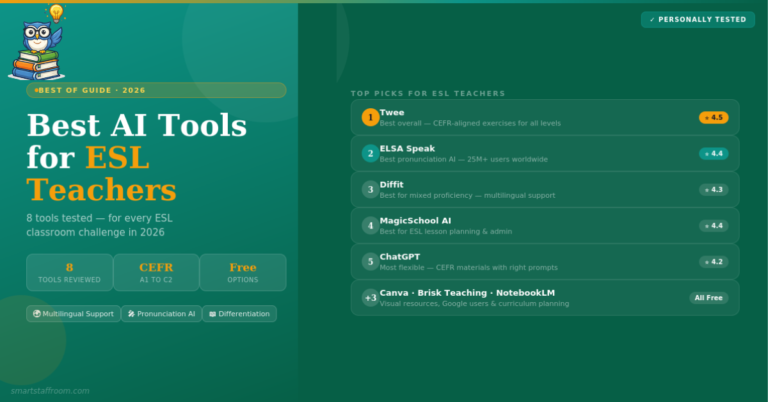
Twee is the best AI lesson planning tool specifically for English and language teachers. It is designed around CEFR levels — the international framework for language proficiency — and produces lesson materials that are perfectly calibrated for each proficiency level from A1 to C2. The team includes dedicated teachers who train the AI to align with language teaching standards, which means outputs are consistently more accurate for language teaching contexts than general AI tools.
What makes Twee special for lesson planning is the engagement factor. You can build lessons around topics students actually care about — Taylor Swift, TikTok, gaming, current events — and Twee generates level-appropriate materials around that topic instantly. Teachers consistently report this as a game-changer for student engagement.
Key Lesson Planning Features
- CEFR-aligned planning — All levels A1 to C2 supported with accurate calibration
- Topic-based lessons — Plan lessons around any topic students find engaging
- Complete exercise suite — Gap fills, multiple choice, matching, reading, writing, speaking
- Grammar worksheets — All CEFR levels with explanations and exercises
- AI assessment tools — Automatic grading including open-ended responses
- Student management — Organise classes, track progress, manage assignments
✅ Pros
- Best tool for language teachers
- CEFR alignment is accurate
- Huge variety of exercise types
- Engaging topic-based lessons
❌ Cons
- Primarily for language teaching
- Less useful for other subjects
- Smaller user base than MagicSchool
Google NotebookLM is the most underused free tool for lesson planning — particularly for university educators and curriculum coordinators. Upload your curriculum documents, textbook chapters, research papers, or syllabus, and NotebookLM becomes an AI expert on that specific content. Ask it to generate lecture outlines, seminar discussion questions, assessment ideas, or reading guides based entirely on your own source material.
The critical advantage for lesson planning is that all outputs are grounded in your uploaded documents — eliminating the hallucination risk that affects other AI tools. Every suggestion cites the source it came from. For curriculum-heavy planning where accuracy is essential, this is invaluable.
Key Lesson Planning Features
- Document-grounded planning — All outputs based on your uploaded curriculum materials
- Cited answers — Every suggestion references its source — no hallucinations
- Lecture outline generator — Structured outlines from your own content
- Discussion questions — Seminar and classroom questions generated from any document
- Audio Overview — Turn any curriculum document into a podcast-style summary
- Completely free — No cost, no credit card, just a Google account
✅ Pros
- Completely free from Google
- No hallucinations — cited sources only
- Perfect for curriculum-heavy planning
- Works from your own documents
❌ Cons
- Only works with uploaded documents
- Less useful for primary/secondary
- Requires Google account
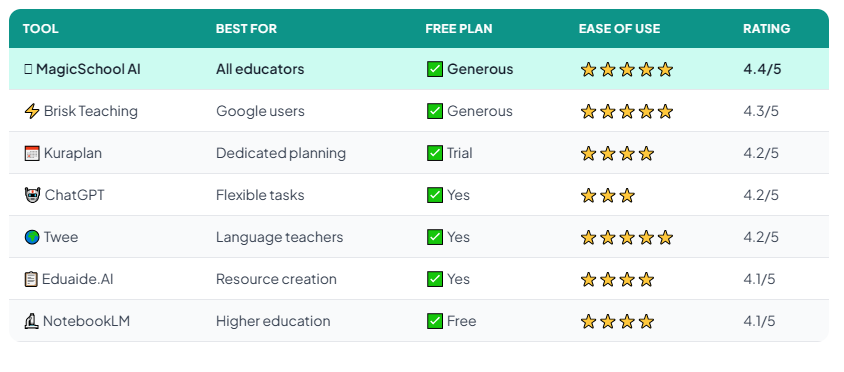
Quick Comparison — All 7 Tools at a Glance
Not sure which lesson planning tool to start with? Here is a side-by-side comparison:
Which Tool Should You Start With?
For most classroom teachers — start with MagicSchool AI. The lesson plan generator is ready to use in minutes with no learning curve, the outputs are classroom-ready, and the free plan is generous enough for daily use.
If you live in Google Docs and Google Classroom — add Brisk Teaching as a Chrome extension. It will change how you plan lessons because everything happens inside the tools you already have open.
If you teach English or a language — Twee is purpose-built for you and will produce better CEFR-calibrated materials than any general tool.
If you are a university lecturer or curriculum coordinator — Google NotebookLM is completely free and produces planning outputs grounded entirely in your own curriculum documents.
Frequently Asked Questions
Start Saving Time on Lesson Planning Today 🦉
Try MagicSchool AI for free — run your next lesson plan through it and see the difference in under 10 minutes. No credit card required.
Try MagicSchool AI Free → See All Our Top Picks🦉 Join 1,000+ Educators
Weekly AI tool reviews · Free resources · No spam
By subscribing you agree to receive weekly emails from Smart Staff Room. Unsubscribe anytime.
Last updated: March 2026.