“This post contains affiliate links. If you click and make a purchase we may earn a small commission at no extra cost to you. We only recommend tools we genuinely believe in.”
Grammarly Review for Teachers 2026 — Is It Worth It?
Grammarly is used by over 30 million people worldwide — but is it actually worth it for teachers? In this honest review we test it specifically for classroom and educational use in 2026, covering feedback on student writing, report writing, parent communication, and every other writing task teachers face.
Teachers write constantly — lesson plans, parent emails, report comments, IEP notes, policy documents, assessment feedback, newsletters, and more. The quality and professionalism of that writing matters — and it also takes significant time. Grammarly promises to make teacher writing faster, more accurate, and more professional.
But with a free plan and a paid Pro plan at $12–$30 per month, the question for teachers is always: is it worth it? And does the free version do enough? Here is our honest verdict after thorough testing.
What Is Grammarly?
Grammarly is an AI-powered writing assistant that checks and improves your writing in real time — wherever you write. It works as a browser extension, desktop app, Microsoft Word add-in, and mobile keyboard, meaning it catches errors and suggests improvements whether you are writing in Gmail, Google Docs, Word, or any other platform.
Founded in 2009, Grammarly has grown to over 30 million daily users and is the world’s most widely used writing assistant. Its core features — grammar checking, spelling correction, clarity suggestions, and tone detection — have expanded significantly with AI, now including full sentence rewrites, plagiarism detection, and an AI writing assistant built directly into the editor.
In 2026 Grammarly renamed its Premium plan to Pro — the features remain identical, just the name changed. The free plan also remains available with basic checking features.
Grammarly Key Features for Teachers
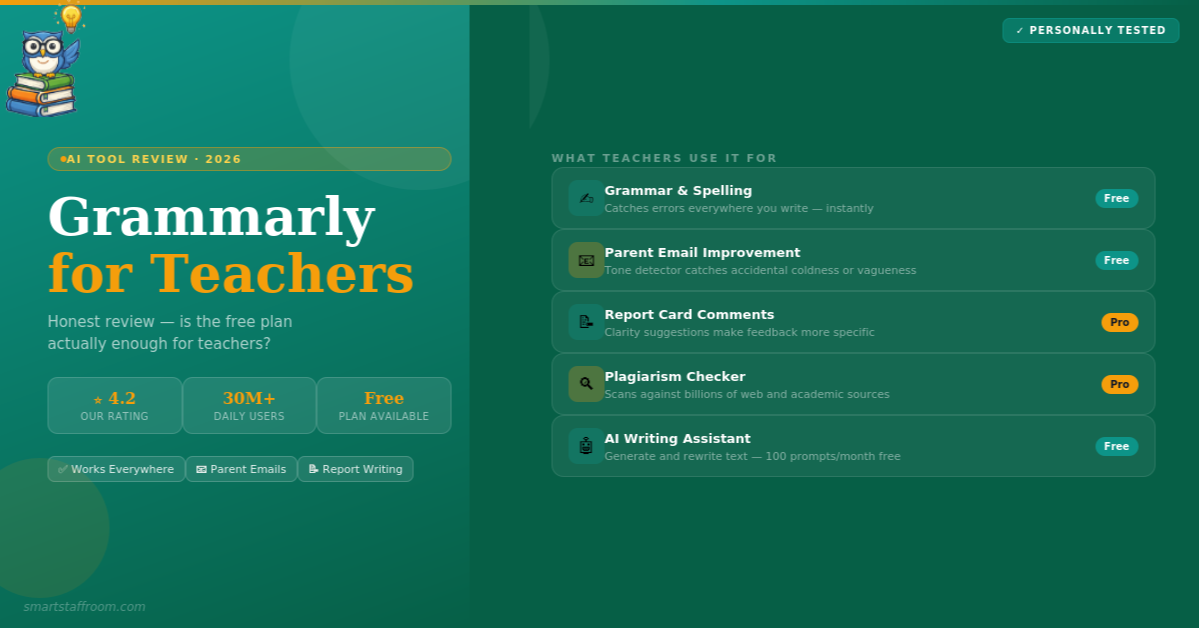
1. Grammar and Spelling Correction
Grammarly’s core feature is real-time grammar and spelling correction across every platform where you write. Unlike a standard spellchecker, Grammarly catches contextual errors — words that are spelled correctly but used in the wrong context — as well as complex grammar issues like subject-verb agreement, incorrect pronoun use, comma splices, and dangling modifiers. For teachers writing quickly under time pressure, this is the most immediately valuable feature.
2. Clarity and Conciseness Suggestions
One of Grammarly Pro’s most useful features for teachers is the clarity engine. It identifies sentences that are unnecessarily complex, wordy, or confusing and suggests rewrites that are clearer and more direct. Report card comments benefit enormously from this — AI catches when your feedback is vague or indirect and suggests more specific, actionable phrasing. Parent emails become more professional. Policy documents become clearer.
3. Tone Detection and Adjustment
Grammarly Pro analyses the tone of your writing — whether it reads as confident, diplomatic, formal, friendly, or direct — and alerts you when the tone might not match your intention. For teachers writing about sensitive topics to parents, or drafting difficult feedback for students, the tone detector is genuinely useful for catching accidental coldness or vagueness before you hit send.
4. Plagiarism Checker
Grammarly Pro includes a plagiarism checker that scans text against billions of web pages and academic sources, producing an originality score. For teachers assigning written work, this is a useful first-line check — though dedicated plagiarism tools like Turnitin provide more comprehensive academic coverage. For checking your own writing for accidental similarity to sources, it is very effective.
5. AI Writing Assistant (GrammarlyGO)
Grammarly’s AI writing assistant allows you to generate, rewrite, and improve text directly within the Grammarly editor. Ask it to rewrite a report comment to sound more encouraging, generate a professional parent email from bullet points, or improve the clarity of a policy document. Free users get 100 AI prompts per month — Pro users get 2,000. For most teachers the free allowance is sufficient for occasional use.
6. Works Everywhere You Write
Grammarly’s biggest practical advantage for teachers is its ubiquity. It works in Gmail, Google Docs, Google Classroom, Microsoft Word, Outlook, Teams, and every major browser — meaning it checks your writing everywhere without switching tabs or copying text into a separate tool. This seamless integration means most teachers find they simply forget it is there — it just quietly catches errors as they write.
- Real-time grammar and spelling — catches errors as you type across all platforms
- Contextual error detection — catches wrong words that spellcheck misses
- Clarity suggestions — rewrites complex sentences for clarity (Pro)
- Tone detector — alerts you when tone might not match intention (Pro)
- Plagiarism checker — scans against billions of web and academic sources (Pro)
- AI writing assistant — generate and rewrite text with AI prompts
- Full sentence rewrites — improve entire sentences with one click (Pro)
- Vocabulary suggestions — more precise and varied word choices (Pro)
- Works in 500,000+ apps — Gmail, Google Docs, Word, Outlook and more
- Citation formatting — checks and corrects citation styles (Pro)
- Mobile keyboard — Grammarly checks on your phone too
- Education institutional plan — free access for students and faculty
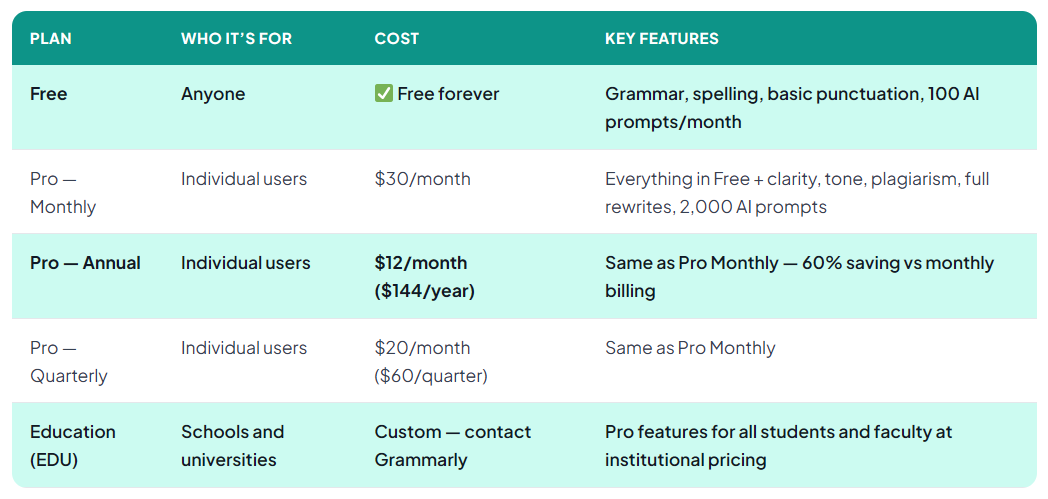
Grammarly Pricing — Free vs Pro vs Education
Free vs Pro — What Does the Free Plan Actually Cover?
This is the most important question for teachers and the honest answer is: the free plan is genuinely useful for many teachers. Here is exactly what you get for free versus what requires Pro:
✅ Free Plan Includes
- Basic grammar correction
- Spelling and punctuation
- Conciseness suggestions (basic)
- Tone detection (basic)
- 100 AI prompts per month
- Works in all apps and browsers
- Mobile keyboard
- Google Docs integration
⭐ Pro Only Features
- Advanced clarity suggestions
- Full sentence rewrites
- Advanced tone suggestions
- Plagiarism checker
- Vocabulary improvements
- Citation style checking
- 2,000 AI prompts per month
- Formatting suggestions
How Does Grammarly Perform for Teaching Tasks?
The grammar and spelling scores are near-perfect — Grammarly is the best tool available for catching writing errors. The ease of use score is the highest of any tool we have reviewed — it is genuinely invisible once installed. The value for money score for the free plan reflects the fact that for many teachers the free features are sufficient. The Pro value score reflects the fact that at $144/year, teachers on tight budgets may find it hard to justify over free alternatives.
Grammarly for Teachers — Specific Use Cases
Parent Emails
This is where Grammarly provides the most consistent value for teachers. Parent communications often need to strike a precise tone — professional but warm, clear but not blunt. Grammarly’s tone detector flags when an email sounds too cold or too vague. The clarity engine catches wordy sentences. Grammar errors that would undermine your professional credibility are caught instantly. For teachers writing dozens of parent emails per week, Grammarly running quietly in the background is genuinely valuable.
Report Card Comments
Report writing season is when many teachers first appreciate Grammarly’s full value. Writing 30 individual report comments under time pressure leads to repeated phrases, vague feedback, and occasional grammar errors. Grammarly catches the errors, flags repeated words, and suggests more specific phrasing. The Pro version’s clarity suggestions are particularly useful here — they push report comments toward more direct, actionable language.
Marking and Student Feedback
Teachers providing written feedback on student work benefit from Grammarly’s clarity suggestions — feedback that is clearly written is more useful to students. The tone detector is also helpful here, flagging when feedback reads as discouraging or vague when you intend it to be constructive.
Lesson Plans and Teaching Documents
For lesson plans and curriculum documents shared with colleagues or administration, Grammarly’s professionalism checks are useful. These documents represent you professionally and benefit from the same accuracy standards as any formal communication.
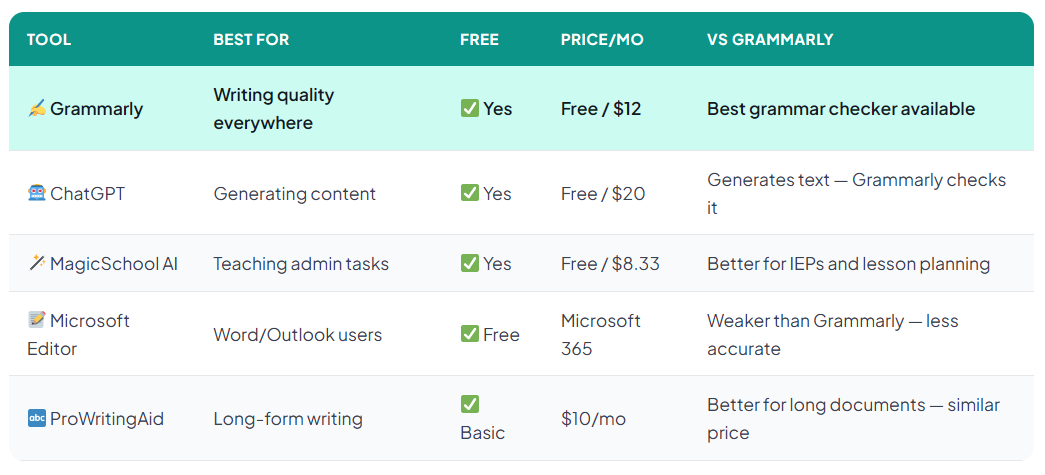
Grammarly vs Alternatives for Teachers
Final Verdict — Is Grammarly Worth It for Teachers?
🦉 Our Verdict
The free plan: Absolutely yes — install it today. It is free, works everywhere, catches the most common writing errors, and requires zero learning curve. Every teacher should have Grammarly Free installed on their browser.
The Pro plan ($12/month annual): Worth it if you write heavily and value the tone detector, plagiarism checker, and advanced clarity suggestions. Not essential for teachers who primarily write short communications. Check if your school has an EDU plan before paying individually.
Our recommendation: Start with the free plan. Use it for 2–4 weeks. If you find yourself hitting the limits of what it catches or wishing for the plagiarism checker and advanced rewrites — upgrade to annual Pro. If the free plan covers your needs — it is genuinely excellent and costs nothing.
Frequently Asked Questions
Start With Grammarly Free Today ✍️
Install the free browser extension right now — it takes 2 minutes and immediately starts improving every email, report, and document you write.
Get Grammarly Free → See All Our Top Picks🦉 Join 1,000+ Educators
Weekly AI tool reviews · Free resources · No spam
By subscribing you agree to receive weekly emails from Smart Staff Room. Unsubscribe anytime.
*Pricing verified from Grammarly’s official website as of March 2026. Grammarly renamed Premium to Pro in 2026 — features remain identical. Last updated: March 2026.